Convert existing QAM coax channels into IPTV multicast streams using Thor H-16QAM-IP or H-8QAM-IP gateways.
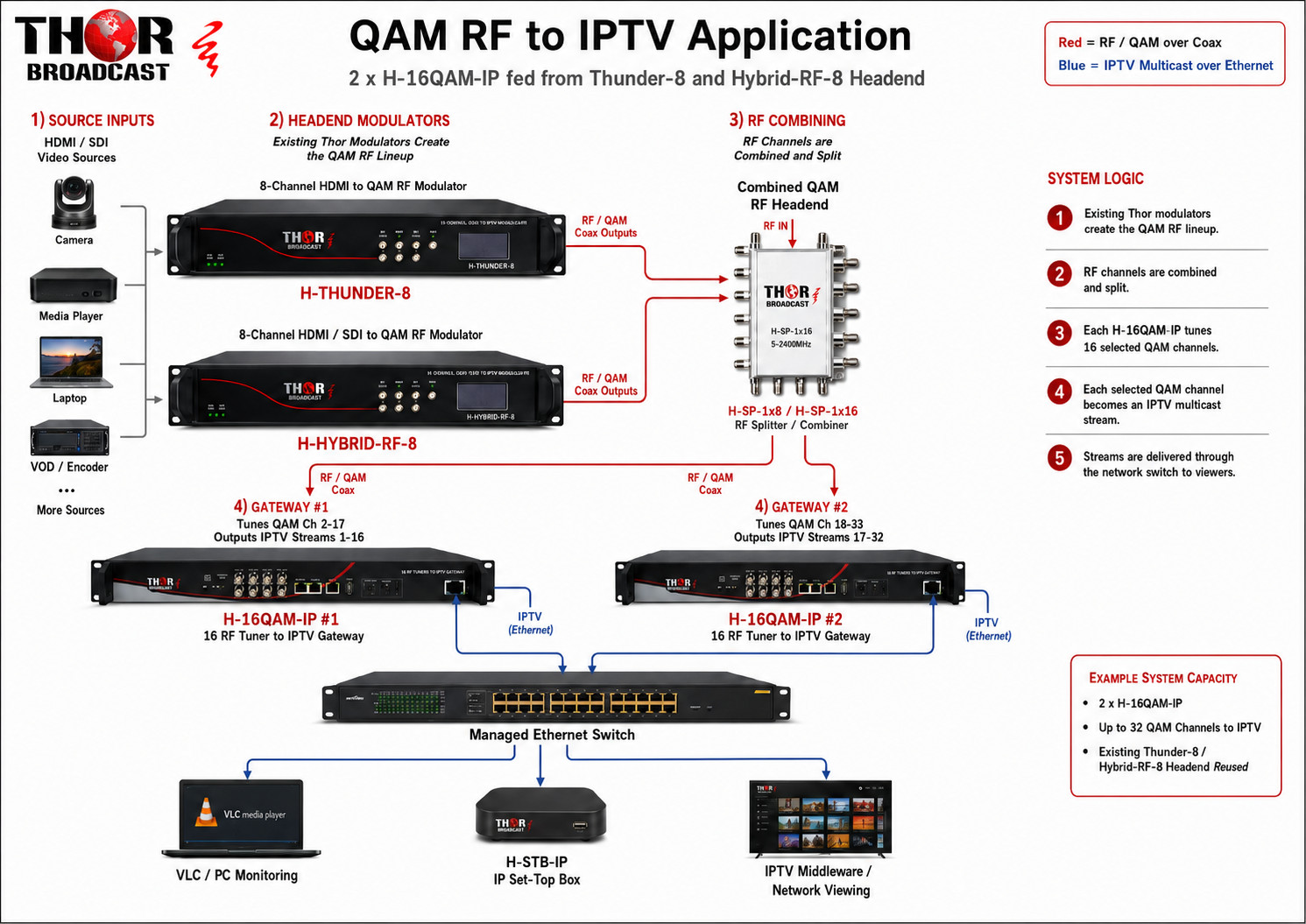
This application explains how to convert an existing in-house QAM coax distribution system into IPTV multicast streams using the Thor Broadcast H-16QAM-IP or H-8QAM-IP QAM to IP gateway. This is a very common upgrade path for facilities that already have Thor HDMI/QAM modulators, Thunder-8 modulators, Hybrid RF-8 modulators, or other QAM RF headend equipment and now want to make the same channels available over an IP network.
In this example, the customer already has multiple Thor RF modulators feeding a coax plant. The goal is not to remove the existing QAM coax system. The goal is to take the already combined QAM RF lineup and convert selected QAM channels into IPTV streams for computers, IPTV set-top boxes, network TVs, middleware systems, or IPTV servers.
Table of Contents
The main product for this application is the H-16QAM-IP. It receives clear QAM RF channels from coax and converts them into IPTV streams over Ethernet. Each unit has 16 independent RF tuners. Each tuner is assigned to one physical QAM channel.
Product page:
H-16QAM-IP - 16 RF Tuners to IPTV Gateway
For smaller systems, the H-8QAM-IP version can be used when only up to 8 QAM channels need to be converted to IP. For larger systems, the H-16QAM-IP is usually the better value because it provides twice the tuner capacity.
Product family page:
H-8QAM-IP / H-16QAM-IP RF Tuners to IPTV Gateway Family
This QAM-to-IP application can include several Thor Broadcast products depending on the existing system size, number of RF channels, and how the customer wants to view or distribute the IPTV streams.
| Product | Purpose in the System | Product Link |
|---|---|---|
| H-16QAM-IP | Main gateway for converting up to 16 QAM RF channels into IPTV streams. | 16 RF Tuners to IPTV Gateway |
| H-8QAM-IP | Smaller 8-tuner version for systems that only need up to 8 QAM channels converted to IP. | 8/16 RF Tuners to IPTV Gateway Family |
| H-STB-IP | IPTV set-top box used at the TV location to receive IPTV streams and output HDMI to the display. | Thor STB / Decoder Product |
| H-THUNDER-8 | 8-channel HDMI to QAM RF modulator used to create QAM RF channels from HDMI sources. | Thunder-8 HDMI to QAM RF Modulator |
| H-HYBRID-RF-8 | 8-channel HDMI and SDI clear CATV RF modulator used to create QAM RF channels from HDMI or SDI sources. | 8-Channel HDMI/SDI Clear QAM RF Modulator |
| H-SP-1x8 | RF splitter/combiner used to distribute the combined QAM RF lineup to multiple tuner inputs. | H-SP-1x8 RF Splitter / Combiner |
| H-SP-1x16 | RF splitter/combiner used for larger systems with multiple QAM-to-IP gateway units. | H-SP-1x16 RF Splitter / Combiner |
The customer already has several Thor modulators installed. These modulators generate clear QAM RF channels and feed an existing in-house coax system. The customer mentioned a system that includes multiple Thor units such as Hybrid-8 modulators, a Thunder-8, and other HDMI to RF modulators.
All of those modulators are already combined together and distributed over coax to TVs in the facility. The customer now wants to make those same QAM channels available as IPTV streams on the network.
The important point is that the customer does not need to individually rewire every modulator output into the QAM-to-IP gateway. Since the QAM channels are already combined into one RF lineup, the gateway can receive that combined RF feed and tune each channel from it.
In this application, the existing Thor QAM modulators remain in the system and continue creating the original RF channels. The H-16QAM-IP or H-8QAM-IP is added after the RF channels are combined.
| Existing Modulator | Function | Product Link |
|---|---|---|
| H-THUNDER-8 | Converts up to 8 HDMI sources into clear QAM RF channels for coax distribution. | Thunder-8 HDMI to QAM RF Modulator |
| H-HYBRID-RF-8 | Converts HDMI and/or SDI sources into clear CATV QAM RF channels. Each channel can be individually configured. | 8-Channel HDMI/SDI Clear QAM RF Modulator |
These modulators generate the original RF channels. Their RF outputs are combined using RF splitters/combiners. After the channels are combined, the H-16QAM-IP or H-8QAM-IP tunes the selected QAM channels and converts them into IPTV multicast streams.
A common misunderstanding is thinking that the H-16QAM-IP replaces the RF combiner. It does not.
The existing RF combiner is still needed because it combines the outputs of all QAM modulators into one complete RF lineup. After the combiner, one coax cable carries many QAM channels. In a typical North American QAM cable system, each RF channel occupies its own 6 MHz channel space.
The H-16QAM-IP works like a professional bank of QAM tuners. It receives the full RF lineup, and each internal tuner is programmed to lock onto one specific QAM channel. That selected QAM channel is then converted to an IPTV stream.
The exact channel numbers, frequencies, multicast addresses, and port numbers are configured during setup. Below is a simplified example to show the concept.
| RF Channel | Possible Source | Gateway Tuner Assignment | IP Output Example |
|---|---|---|---|
| QAM Channel 2 | Thunder-8 Channel 1 | Tuner 1 | udp://@224.2.2.2:1000 |
| QAM Channel 3 | Thunder-8 Channel 2 | Tuner 2 | udp://@224.2.2.3:1000 |
| QAM Channel 4 | Hybrid RF-8 Channel 1 | Tuner 3 | udp://@224.2.2.4:1000 |
| QAM Channel 5 | Hybrid RF-8 Channel 2 | Tuner 4 | udp://@224.2.2.5:1000 |
Each RF tuner can tune one physical QAM RF channel. The correct gateway size depends on how many QAM channels the customer wants to convert into IPTV.
| Number of QAM Channels to Convert | Recommended Thor Product | Total Tuner Capacity | Best Use Case |
|---|---|---|---|
| Up to 8 QAM channels | H-8QAM-IP | 8 tuners | Small systems or partial channel conversion |
| Up to 16 QAM channels | 1 x H-16QAM-IP | 16 tuners | Medium QAM-to-IP systems |
| Up to 32 QAM channels | 2 x H-16QAM-IP | 32 tuners | Typical system for multiple Thor modulators |
| Up to 48 QAM channels | 3 x H-16QAM-IP | 48 tuners | Large QAM headend to IPTV conversion |
In the discussed customer application, the estimated system size was around 32 to 37 physical QAM channels. For 32 channels, two H-16QAM-IP units are sufficient. If the final channel count is closer to 37 channels, three H-16QAM-IP units are recommended to provide up to 48 tuners.
The RF input on the gateway should not be viewed as a direct input for one modulator. The correct way to understand the system is:
For example, if one Thunder-8 produces eight QAM channels and one Hybrid RF-8 produces another eight QAM channels, those outputs should first be combined. The H-16QAM-IP can then tune to any of those combined QAM channels from the final RF feed.
The H-16QAM-IP has multiple RF tuner inputs and loop-through connections. It is technically possible to feed one RF input and loop the signal through multiple tuners. However, every loop-through connection introduces some RF loss.
If the RF signal is looped through too many tuner inputs, the last tuners in the chain may receive a weaker signal. This can cause poor tuning performance, errors, or unstable IPTV output.
After the RF combiner, use a local RF splitter to feed several tuner sections instead of looping through all 16 inputs in one long chain.
For example, instead of feeding tuner 1 and looping through all the way to tuner 16, a better method is:
The QAM-to-IP gateway receives the combined RF lineup from the customer’s existing coax system. For proper RF level management, Thor recommends using local RF splitters/combiners to feed the tuner inputs in smaller groups instead of looping one RF signal through too many tuner ports.
This is especially important when using one or more H-16QAM-IP units. Each loop-through connection has some insertion loss, so using a splitter helps keep the RF signal level more balanced across all tuners.
| Accessory | When to Use | Product Link |
|---|---|---|
| H-SP-1x8 | Recommended for feeding sections of one or two H-16QAM-IP units from the combined QAM RF output. | H-SP-1x8 RF Splitter / Combiner |
| H-SP-1x16 | Recommended for larger systems, multiple gateway units, or when more local RF feed points are needed. | H-SP-1x16 RF Splitter / Combiner |
This is the most likely solution for the customer in the conversation.
Both H-16QAM-IP units can receive the same complete RF lineup. Unit 1 is programmed to convert the first group of channels, and Unit 2 is programmed to convert the second group of channels.
If the final channel count is more than 32 channels, the system should use three H-16QAM-IP units. This provides up to 48 total tuners.
The gateway can see the full RF lineup, but each physical tuner can only convert one QAM channel at a time. This is why the number of tuners must match the number of QAM channels that need to be converted.
The gateway outputs IPTV through a standard RJ45 Ethernet port. This port connects to the customer’s network switch.
Each selected QAM program can be assigned its own multicast address. For example:
| IPTV Channel | Multicast Address Example | Playback Example |
|---|---|---|
| Channel 1 | 224.2.2.2:1000 | udp://@224.2.2.2:1000 |
| Channel 2 | 224.2.2.3:1000 | udp://@224.2.2.3:1000 |
| Channel 3 | 224.2.2.4:1000 | udp://@224.2.2.4:1000 |
For testing, the customer can open the streams directly in VLC. For a more professional installation, the multicast streams can be mapped into H-STB-IP set-top boxes, middleware, or a managed IPTV server.
VLC is a simple way to test the multicast streams on a computer. The user enters the multicast URL, and the video plays directly from the network.
udp://@224.2.2.2:1000
This is good for engineering tests, temporary viewing, and verification.
For TV viewing, the multicast IPTV streams from the H-16QAM-IP can be received by IPTV set-top boxes such as the Thor H-STB-IP. The set-top box connects to the network switch by Ethernet and outputs HDMI to the television.
This is useful when the customer wants a simple TV viewing point without using a computer. Each set-top box can be programmed with the multicast stream addresses generated by the H-16QAM-IP.
Related product:
Thor H-STB-IP / STB Decoder Product
If the facility needs a polished user interface, channel guide, user permissions, browser viewing, mobile apps, or centralized channel management, then a separate IPTV middleware or server platform may be used.
The H-16QAM-IP creates the IPTV multicast streams. The middleware or IPTV server provides the user-facing management layer.
Since IPTV multicast can generate significant network traffic, Thor recommends using a properly configured managed switch.
IGMP Snooping is especially important because it helps the switch send multicast video only to the ports that requested the stream. This prevents unnecessary multicast flooding across the network.
| Function | Explanation |
|---|---|
| Converts QAM RF to IPTV | Yes. The unit tunes clear QAM channels and outputs IP transport streams. |
| Replaces the RF combiner | No. The existing RF combiner remains part of the system. |
| Receives a combined QAM lineup | Yes. One coax feed can carry many QAM channels. |
| Tunes unlimited channels | No. Each tuner converts one physical QAM channel at one time. |
| Outputs multicast IPTV | Yes. Each selected channel can be output as its own IPTV stream. |
| Provides complete IPTV middleware | No. The gateway creates the streams. Middleware or IPTV management software is separate if needed. |
This application is ideal for the H-16QAM-IP because the customer already has a working QAM coax system. Instead of rebuilding the entire headend, the customer can reuse the existing RF lineup and convert it into IPTV.
Main advantages:
Multiple Thor QAM modulators are already generating QAM RF channels. These are combined and distributed over coax inside the facility.
Add IPTV access to the same channels without removing the existing QAM coax plant.
Use two H-16QAM-IP gateways for up to 32 QAM channels, or three H-16QAM-IP gateways if the final channel count is closer to 37-48 channels. Use the H-8QAM-IP only if the system requires 8 or fewer QAM channels to be converted.
Take the combined RF output after the combiner, split it locally with H-SP-1x8 or H-SP-1x16 RF splitters, feed the H-16QAM-IP tuner inputs, configure each tuner to the desired QAM channel, and connect the Ethernet output from each gateway to a managed network switch.
Users can view channels with VLC for testing, H-STB-IP set-top boxes for TV viewing, or an IPTV middleware/server platform for a managed user experience.
The easiest way to understand this system is to think of the H-16QAM-IP as a professional tuner bank. Your coax line already contains many TV channels. The gateway does not need the original HDMI or SDI sources. It simply listens to the existing QAM RF channels, tunes the ones you select, and puts them onto your Ethernet network as IPTV streams.
If you have 32 QAM channels, you need 32 tuners. Since each H-16QAM-IP has 16 tuners, two units are required. If you have more than 32 channels, add a third unit. The RF feed can be the same combined coax lineup for all units; each unit is simply programmed to tune a different group of channels.
This makes the H-16QAM-IP a practical bridge between traditional coax QAM distribution and modern IPTV distribution.


 ES
ES