Thor Broadcast Logo
Log in
Cart (0)
  • es ES
  • Products
    • CATV Modulators
      • HDMI RF Modulators
      • HD-SDI converters
      • IP to CATV Edge Modulators
    • DVB Encoders
      • IPTV Video Encoders
      • Hdmi RTSP RTMP RTSP Encoders
      • Transcoders, MPEG Converters, IP ASI Gateways
    • Decoders (IRD's & STB's)
      • RF input - Video /Audio Ouput
      • IP Broadcast Decoders
      • RF CATV and IPTV OTT STB's
    • Satellite Modulators
      • DVB-S/S2 Satellite Modulators
    • Fiber Optic Transport
      • SDI Fiber Optic Extenders, Digital Audio Extenders
      • SDI SD/HD/3G with CWDM
      • Cable TV CATV RF 45-900Mhz
      • L-Band Satellite RF 45-3000Mhz
      • Data & Ethernet over fiber
    • HDMI SDI Switchers, LAN Extenders, and Wireless Video Transport
      • HD Video Switchers and Signal Format Converters for AV Pros
      • Wireless HD SD Video Data Equipment
      • Video Audio Extenders Over Ethernet LAN IP Network
    • DIscounted Inventory
      • Satellite and CATV Broadcast Equipment for Sale
      • Lab Used Broadcast Equipment on sale
      • Past Generation Equipment
    • SDI Monitors
    • Warehouse
  • About
  • Client Portfolio
  • Support
      • Support Center Support Center
      • User Manuals User
        Manuals
      • Request an RMA Request an
        RMA
  • ⬇Download
    • Manuals
    • Datasheets
    • Quick Guides
  • Case Studies
    • THOR Gym
    • THOR Stadium
    • THOR Hotel
    • THOR University
  • Videos
  • Contact
  • Become a Reseller
  1. Products
  2. PTZ Streaming Cameras Broadcast cameras with SDI ,HDMI CVBS USB
  3. MaximusControl - Professional Grade Video PTZ Controller
back

MaximusControl - Professional Grade Video PTZ Controller

Model: MaximusControl
Qty: 0
Product image Previous Next
Product image
Product image
Product image
Price: $395.00
Availability: In stock Condition: new QR Code MaximusControl - Professional Grade Video PTZ Controller
Shipping: starting at $0.00 Warranty: 1Yrs
Quantity:
ask about product
send request
Description Features Drawings Video Models Accessories Specification Q&A
Documents
  • Manual
  • Datasheet
  • Quick Guide
Support

Description

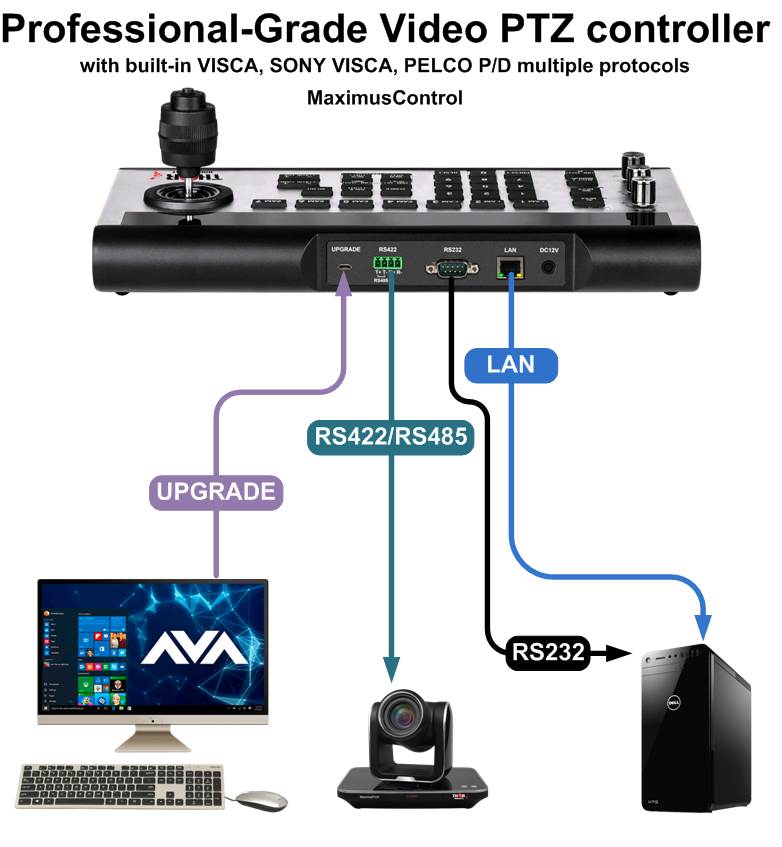
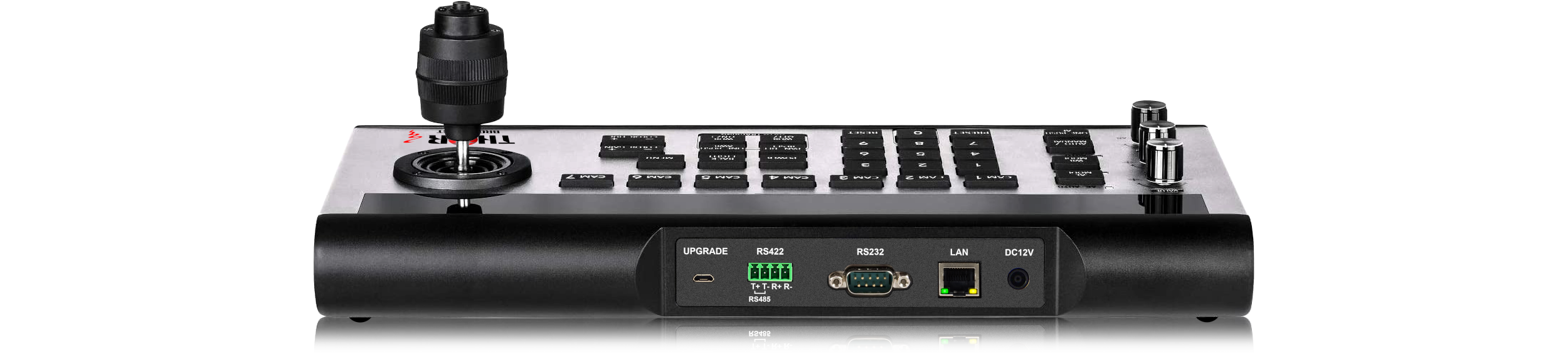
The Thor MaximusControl is the only necessary accessory for your Thor PTZ Camera, the control center is a professional-grade video PTZ controller with built-in VISCA, SONY VISCA, PELCO P/D multiple protocols.

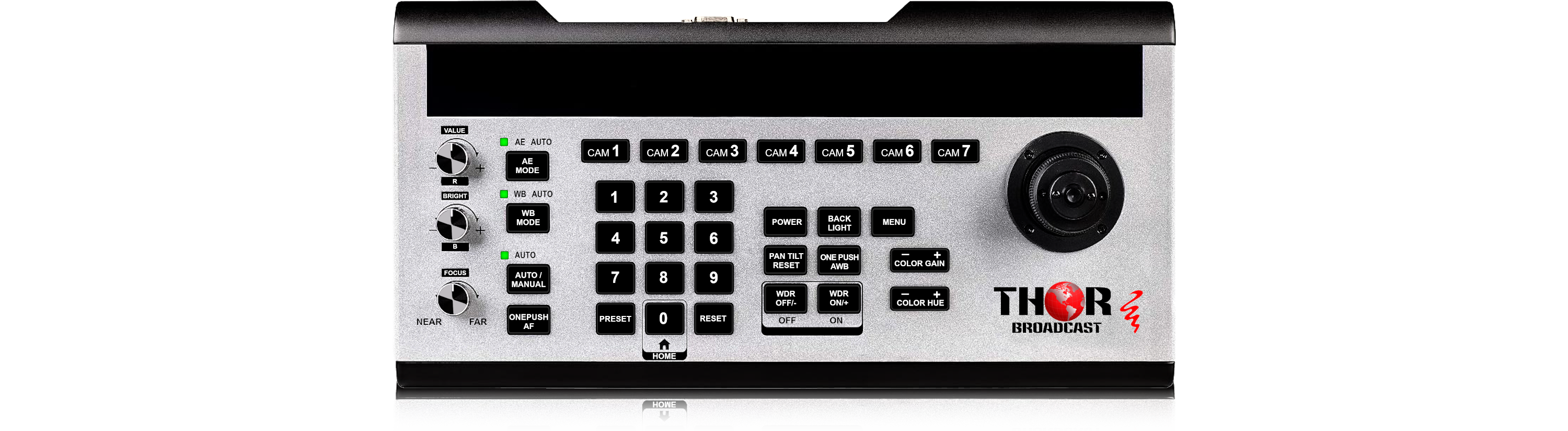
Supports RS422/RS485/RS232/IP (VISCA OVER IP), etc. compatible with SONY, PANASONIC, DATAVIDEO, Lumens, PTZ Optics, AIDA, Marshall and other cameras. Simple configuration, easy to operate; has 7 channel camera shortcut channel button, and 3 infinite rotation buttons. Manual and automatic focus mode for flexible switching. It is an indispensable device for Live Streaming & Broadcasting, Events, Conferencing, Education, and Telemedicine.

It can PTZ control 7 different cameras and protocols at the same time

The Maximus control is able to independently select from Pelco-D,
Pelco-P, Visca, and Sony Visca protocols. Each camera input can
utilize a different protocol and baudrate so you are able to adapt and
control different cameras from different manufacturers all with the
same controller.

Features

Multiple protocols, strong compatibility

Built-in mainstream protocols such as VISCA, SONY VISCA, PELCO P/D, compatible with any PTZ camera under standard VISCA protocol, and customized SONY VISCA protocol for SONY cameras, supporting SONY SRG series.

Abundant communication interface and simple connection

RS422, RS232, RS485, IP (Visca Over IP) and other interface communication, compatible with various devices and cameras, including SONY/ Panasonic / Lumens/ Datavideo / PTZ Optics / Aida

Strong sense of operation experience

Control the camera with eight directional movements, super-experience Zoom In/Out & focus experience, showing a different close-up effects for your video.

AE/WE

Personalized switching in AE/WE mode to choose the right mode and priority level for your scene.

Auto & Manual Focus

Manual focus and One-Key auto focus or one push AF by remote

7-Channel Camera Shortcut Button

Up to 7 channels of camera shortcut switching, independent of each other, and supports more than 2 communication modes working simultaneously

Remote Power ON/OFF Camera

Remotely power ON/OFF camera by the keyboard and automatically detect the power-on status of your PTZ camera

255 Presets & 255 PTZ Cameras

Maximum support for 255 presets & 255 PTZ Cameras

Customized LOGO Display on the OLED Screen Panel

OLED Screen display, easy operation

Supports remote online upgrades

Drawings

Video

Product Video
Easiest way to send live stream from cameras directly to the Computer Browser or OBS software
Learn how to use live video streaming form Thor HD IP broacast cameras .In today's video we show you a few camera models that have a built in GUI. We start by making sure you can connect to the camera, showing you how to login to the camera by going step by step in your PC settings to make sure you have your camera on the same subnet as the PC. Once you see the login screen on Internet Explorer, Install Active X, and showing you the options menu. From here we can show you some PTZ options, zoom, scrolling, setting up presets. We then go over some protocols built in the camera. It shows also how to change the PC IP adreses so the PC and Cameras are on the same IP Subnet PTZ 20x Zoom Live Streaming HD 1080p Camera with SDI-HDMI-USB Outputs - MaximusProX https://thorbroadcast.com/product/ptz-20x-zoom-live-streaming-hd-1080p-camera-with-sdi-hdmi-usb-8230.html 20 X zoom Full HD 3G SDI HDMI and IP Streaming BOX camera - MaximusH265Pro https://thorbroadcast.com/product/20-x-zoom-full-hd-3g-sdi-hdmi-and-ip-8230.html 4K HDMI and USB E PTZ Compact Camera - Maximus4KFly https://thorbroadcast.com/product/4k-hdmi-and-usb-e-ptz-compact-camera-maximus4kfly.html MaximusControl - Professional Grade Video PTZ Controller https://thorbroadcast.com/product/maximuscontrol-professional-grade-video-ptz-controller.html 8 channel HDMI and SDI Clear CATV RF Modulator QAM, ATSC, DVB-T, ISDB-T H-HYBRID-RF-8 https://thorbroadcast.com/product/8-channel-hdmi-and-sdi-clear-catv-rf-modulator-qam-8230.html

Model Selection

Accessories & Upgrades

Specification

Interface & Settings

  • Communication: RS485 /  RS422  /  RS232 IP (VISCA OVER IP)
  • Baudrate: 2400 4800 9600 19200 38400 (Only for RS-422 / RS-485 / RS-232)
  • ID: 1-7, Others , It can PTZ control 7 different cameras and protocols at the same time
  • IP: 192.168.1.162 (163.164.165.166.167.168) with different Camera Channel (Default)
  • UDP Port 08090 default
  • VISCA PORT: 08090


User Interface

  • Display: OLED Display
  • Camera Channel: 7 Channel
  • Rotation Button: 3-Knobs ( R, G, Focus)
  • Joystick: 3-Axis ( Eight Direction+ Zoom In/Out)
  • Number Button: 32 Button Keys
  • Protocol: VISCA / SONY VISCA / PELCO P/D / UDP (Visca Over IP)
  • Upgrade: USB TO Micro 5Pin Cable or Series Cable


General Parameters

  • Working Temperature: 0 ~ 40C and 32°F ~ 104°F
  • Storage Temperature: -20 ~ 60C and -4°F ~ 140°F
  • Size ( L*W*H) : 350*173*99mm
  • G.W (KGS): 2.6KGS


In the Box

  • Pro Video PTZ Controller MaximusControl
  • Power supply adapter
  • User Manual
  • 4Pin Terminal

Question and Answers

Question:
I called you a few days ago for help connecting our older Sony SRG-300 SE to your controller (which we like). Thanks for trying to help out. Turns out the solution was to change the address on the controller back to 001 (see picture). We had factory reset the Sony PTZ camera and assigned it the address 004 on the controller together with the "CAM 4" button (as it's the 4th camera in our setup), but it looks like the Sony needs the address 001 to connect. There is no place inside the Sony web interface to assign or change the camera address, so I guess it just defaults to 001. One can still choose the "CAM 4" button and assign its own IP address in the controller, of course. 
 
Anyway, we are happy it works now and you said you were interested to know the solution. We also got the Panasonic UE50 working fine now with the Raspberry Pi workaround, programming a translator program with Claude AI. Now also the manual iris and focus work fine with the MaximusControl. 

Answer:

Thank you so much for letting us know!

We’re very happy to hear that the controller is working correctly with both Sony and Panasonic cameras.

Please don’t hesitate to reach out if you have any questions, need setup tips, firmware updates, or additional accessories. We’re here to help ensure everything performs at its best.

Thor Broadcast Family 

Documents

maximuscontrol-manual.pdf

MaximusControl - Professional Grade Video PTZ Controller

Previous Next
Ask about MaximusControl - Professional Grade Video PTZ Controller

Contact form

This site is protected by reCAPTCHA and the Google Privacy Policy and Terms of Service apply.
*necesario
Thor Broadcast Sales

Email: [email protected]
Phone: 1(800) 521 8467 Ext 1
FAX: 1(800)521-6384


Get In Touch
Customer Service/ Support

Phone: 1-800 521 8467 Ext 2
Email: [email protected]
Login

Login


Forgot your password? Remind password
Don't have an Account? Register
Login by:facebookGoogle
The product has been added to the basket:
MaximusControl - Professional Grade Video PTZ Controller
Go to shopping cart
Similar products:

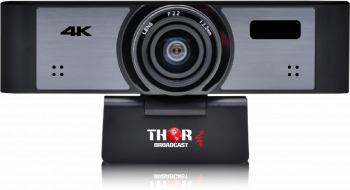
20x Zoom Full HD 3G SDI HDMI and IP Streaming Box Camera with POE 20x Zoom Full HD 3G SDI HDMI and IP Streaming Box Camera with POE

The MaximusH265Pro is an 20x BOX HD-SDI / HDMI and integrated IP streaming POE camera that includes advanced image processing algorithms and high-quality HD CMOS sensors, a motion estimation algorithm based on 2D / 3D digital noise reduction, low-Illumination with clear image, multi-interface video output, that is easy to set up and use. Widely used in government agencies, Fortune 500 enterprises, small and medium-sized conference rooms, churches, house of worship, courts, public security systems, police and enforcement, education, CCTV, intelligent transportation, and medical facilities.

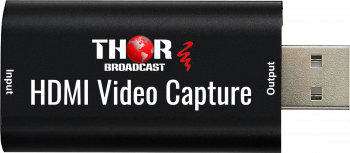
HDMI to USB 2.0  Audio Video Capture Device, High Definition 1080p 30fps Record Directly to Computer for Gaming Streaming HDMI to USB 2.0 Audio Video Capture Device, High Definition 1080p 30fps Record Directly to Computer for Gaming Streaming

Thor video Audio mini capture device can capture both HDMI video and HDMI audio, sending audio and video signals to computers and push to online live broadcast platforms. Perfect for live streaming, gaming, video conferencing, etc.

Contact Us

Thor Broadcast Sales

[email protected]
1(800)521-THOR (8467) Ext 1
1(800)521-6384

Customer Service/ Support

1(800)521-THOR (8467) Ext 2
[email protected]


  • CATV Modulators:
    • HDMI RF Modulators
    • HD-SDI converters
    • IP to CATV Edge Modulators
  • DVB Encoders:
    • IPTV Video Encoders
    • Hdmi RTSP RTMP RTSP Encoders
    • Transcoders, MPEG Converters, IP ASI Gateways
  • Decoders (IRD's & STB's):
    • RF input - Video /Audio Ouput
    • IP Broadcast Decoders
    • RF CATV and IPTV OTT STB's
  • Satellite Modulators:
    • DVB-S/S2 Satellite Modulators
  • Fiber Optic Transport:
    • SDI Fiber Optic Extenders, Digital Audio Extenders
    • SDI SD/HD/3G with CWDM
    • Cable TV CATV RF 45-900Mhz
    • L-Band Satellite RF 45-3000Mhz
    • Data & Ethernet over fiber
    • Analog Audio Video
    • Fiber Amplifiers - EDFA
    • DVB - ASI
    • Fiber Jumpers, Cables, Attenuators,
    • Optic Splitters Couplers CWDM Muxes
    • Optical Meters, Test Equipment, Accesories
    • Analog Baseband Video Audio, RS485/422/232 Data, Contact Closure
  • HDMI SDI Switchers, LAN Extenders, and Wireless Video Transport:
    • HD Video Switchers and Signal Format Converters for AV Pros
    • Wireless HD SD Video Data Equipment
    • Video Audio Extenders Over Ethernet LAN IP Network
  • HD 4K Cameras, SDI - HDMI - IP Streaming - PTZ - Broadcast and Security:
    • PTZ Streaming Cameras Broadcast cameras with SDI ,HDMI CVBS USB
  • DIscounted Inventory:
    • Satellite and CATV Broadcast Equipment for Sale
    • Lab Used Broadcast Equipment on sale
    • Past Generation Equipment
  • SDI Monitors:
  • Warehouse:


Thor Broadcast Logo
Email: [email protected]
Phone: 1(800) 521-8467 Ext 1
FAX: 1(800)521-6384
Information:
  • About us
  • Client Portfolio
  • Become a Reseller
  • Contact
  • Articles
  • Return Policy
  • Shipping Policy
  • International Order Policy
Popular:
  • RF Modulator
  • HDMI over COAX
  • HDMI over IP
  • COAX to HDMI
  • HDMI to SDI

Thor Broadcast
Torrance Business Park
2421 W 205th St
Torrance
CA 90501

© 2026 Thor Broadcast
Subscribe to our newsletter

Sign up here to get the latest news, updates and special offers delivered directly to your inbox.

You can unsubscribe at any time
newsletter image