Thor Broadcast Logo
Log in
Cart (0)
  • es ES
  • Products
    • CATV Modulators
      • HDMI RF Modulators
      • HD-SDI converters
      • IP to CATV Edge Modulators
    • DVB Encoders
      • IPTV Video Encoders
      • Hdmi RTSP RTMP RTSP Encoders
      • Transcoders, MPEG Converters, IP ASI Gateways
    • Decoders (IRD's & STB's)
      • RF input - Video /Audio Ouput
      • IP Broadcast Decoders
      • RF CATV and IPTV OTT STB's
    • Satellite Modulators
      • DVB-S/S2 Satellite Modulators
    • Fiber Optic Transport
      • SDI Fiber Optic Extenders, Digital Audio Extenders
      • SDI SD/HD/3G with CWDM
      • Cable TV CATV RF 45-900Mhz
      • L-Band Satellite RF 45-3000Mhz
      • Data & Ethernet over fiber
    • HDMI SDI Switchers, LAN Extenders, and Wireless Video Transport
      • HD Video Switchers and Signal Format Converters for AV Pros
      • Wireless HD SD Video Data Equipment
      • Video Audio Extenders Over Ethernet LAN IP Network
    • DIscounted Inventory
      • Satellite and CATV Broadcast Equipment for Sale
      • Lab Used Broadcast Equipment on sale
      • Past Generation Equipment
    • SDI Monitors
    • Warehouse
  • About
  • Client Portfolio
  • Support
      • Support Center Support Center
      • User Manuals User
        Manuals
      • Request an RMA Request an
        RMA
  • ⬇Download
    • Manuals
    • Datasheets
    • Quick Guides
  • Case Studies
    • THOR Gym
    • THOR Stadium
    • THOR Hotel
    • THOR University
  • Videos
  • Contact
  • Become a Reseller

ATSC to IP Gateway for IPTV Distribution

ATSC to IP gateway guide for IPTV delivery using multicast, SPTS, bandwidth planning, and Thor Broadcast equipment.

ATSC to IP Gateway for IPTV Distribution: A Practical Education Guide for Multicast, SPTS, Bandwidth, and Headend Design

This knowledge base article explains how to move local off-air ATSC channels into an IPTV system, when to use a direct RF-to-IP gateway, when to re-encode to H.264 for bandwidth efficiency, and how to plan decoding, monitoring, and multicast transport on the receiving side.

ATSC to IP Gateway IPTV Distribution UDP Multicast SPTS / MPTS IGMP Switching H.264 Encoding

Table of Contents

  • System Overview
  • Why a Direct ATSC to IP Gateway Is Often the Best Starting Point
  • How SPTS Improves Channel-Level Transport Efficiency
  • Bandwidth Planning for ATSC over IP
  • Multicast, IGMP, and Network Design Considerations
  • When to Choose H.264 or H.265 Encoding Instead
  • Recommended Thor Broadcast Products for This Design
  • Example Deployment Workflow
  • Frequently Asked Questions
  • Conclusion

ATSC to IP Gateway for IPTV Distribution

System Overview

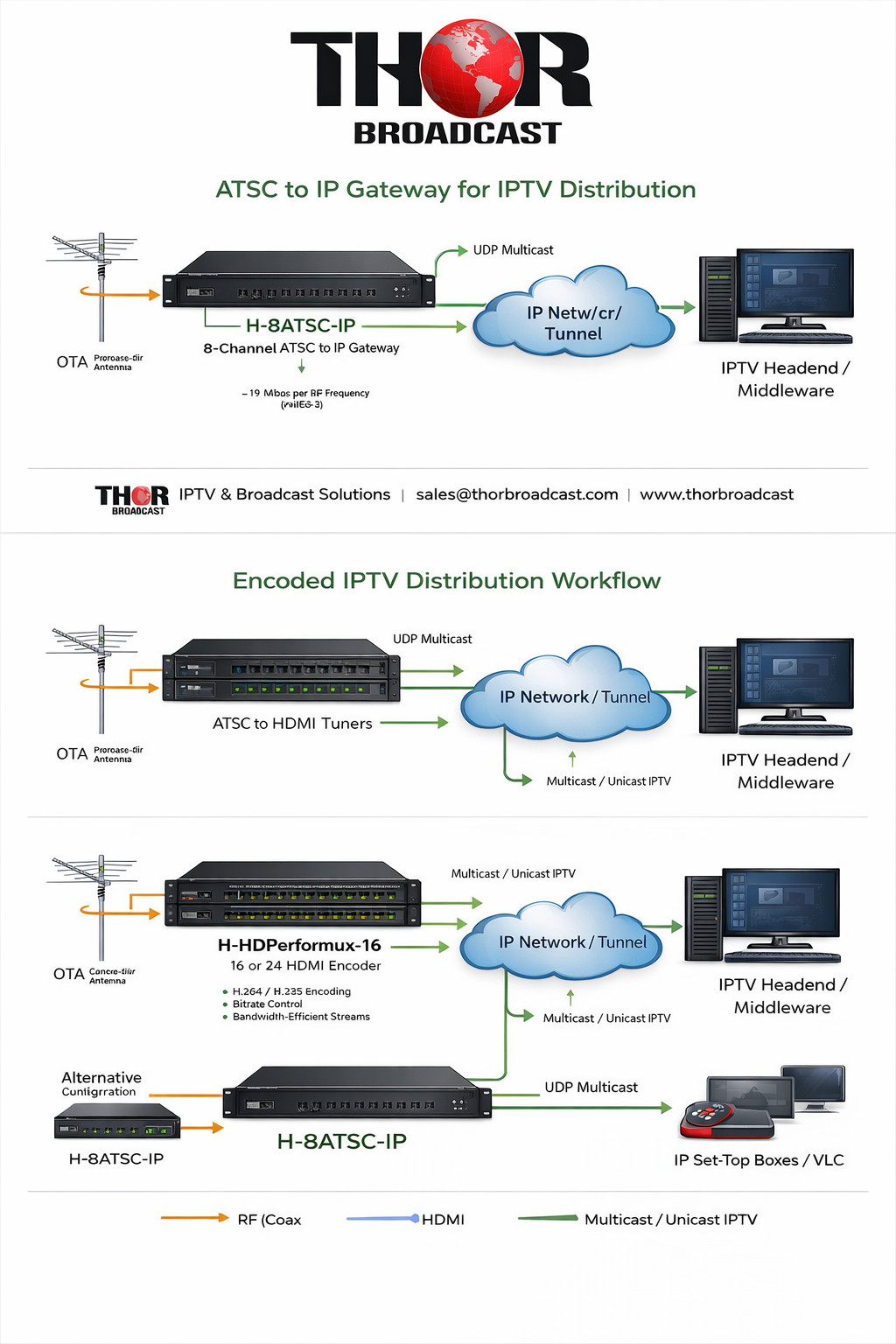
A common IPTV challenge is adding local channels to a remote headend. In many deployments, the local ATSC signals are available at one site, but the IPTV platform is located elsewhere. The objective is to receive the RF channels, select the required programs, and transport them over IP to the headend for ingestion into the IPTV platform.

The most important design decision is whether the IPTV system can accept the original transport stream format directly, or whether the channels need to be converted into a different codec such as H.264. That single requirement determines whether a simple ATSC to IP gateway is enough, or whether a tuner-plus-encoder workflow is needed.

Educational takeaway: If the IPTV platform can ingest the original ATSC program streams, a direct gateway is usually the simplest, lowest-cost, and highest-quality option. If the network is constrained or the headend requires H.264, then re-encoding becomes the better path.

Why a Direct ATSC to IP Gateway Is Often the Best Starting Point

In many real-world deployments, a direct RF-to-IP gateway is the most efficient solution because it does not transcode or alter the original video. It simply tunes the ATSC channels, identifies the services inside each RF carrier, and makes those services available as IP streams.

This means the gateway preserves the original picture quality and transport characteristics. The stream that comes out is effectively the stream that went in, just translated from RF/coax to Ethernet/IP delivery. That is particularly attractive when quality preservation, low latency, and system simplicity matter more than maximum compression.

Direct Transport Benefits

  • No video re-encoding step
  • Original broadcast quality retained
  • Lower latency and less processing
  • Simpler deployment and troubleshooting
  • Strong fit for multicast IPTV systems

Best Fit Use Cases

  • Transporting local channels to a remote IPTV headend
  • Delivering MPEG-2 or H.264 streams exactly as received
  • Maintaining quality without transcoding loss
  • Selecting subchannels rather than forwarding the full multiplex

How SPTS Improves Channel-Level Transport Efficiency

One of the most important capabilities in an ATSC to IP deployment is SPTS, or Single Program Transport Stream. Instead of moving the entire RF multiplex as one large payload, SPTS allows the operator to choose only the subchannels or programs that matter.

For example, if one RF carrier includes several subchannels and only two or three are required for the IPTV lineup, those can be extracted and output as separate multicast or unicast streams. This is a practical way to avoid carrying unwanted services across the network while still preserving the original program quality of the selected channels.

Important distinction: SPTS helps reduce unnecessary transport of unwanted programs, but it does not perform codec compression. If the source service is MPEG-2, the IPTV output remains MPEG-2 unless you intentionally decode and re-encode it.

Bandwidth Planning for ATSC over IP

Bandwidth planning should start with a realistic understanding of the source. ATSC transport streams can approach roughly 19 Mbps for a full RF stream, depending on the service mix. If you pass the entire transport stream, that full rate must be accommodated on the network. If you extract only selected services via SPTS, the transport load can be reduced, but the degree of savings depends on how much of the multiplex is being omitted.

In a project with approximately 6 RF channels and around 16 total desired programs, the main bandwidth questions are:

  • Will the system forward full MPTS streams or only selected SPTS streams?
  • How many HD programs versus SD subchannels will be transported?
  • Does the IPTV headend accept MPEG-2 directly, or does it require H.264?
  • Is the transport network private and multicast-ready, including IGMP-aware switching?

When the network is stable and multicast-capable, direct SPTS transport can be highly practical. When the link is constrained, or when H.264 is mandated by the IPTV platform, encoding becomes the bandwidth-optimized design.

Multicast, IGMP, and Network Design Considerations

IPTV distribution is often best handled with UDP multicast, especially when multiple receivers or downstream systems need access to the same services. Multicast is efficient because one stream can serve multiple destinations without duplicating traffic for every endpoint.

A multicast-ready network should be designed with a proper IP switch and IGMP support. IGMP allows the switch infrastructure to manage multicast group membership so traffic is forwarded only where needed. Without correct multicast handling, IPTV traffic can become wasteful or unstable.

Best practice: Before ordering equipment, confirm that the transport path, edge switches, and the receiving IPTV environment support multicast and IGMP. This single check often determines whether the deployment remains simple or becomes more complex.

When to Choose H.264 or H.265 Encoding Instead

A gateway is ideal when you want a direct RF-to-IP translation. However, there are cases where a re-encoding workflow is the better answer. The two most common reasons are:

  1. The available network bandwidth is limited and the source bitrate needs to be compressed more aggressively.
  2. The IPTV platform or endpoint ecosystem expects H.264 rather than the original ATSC-delivered stream format.

In that scenario, the design changes. Instead of simply translating RF to IP, the channels must first be decoded to baseband or HDMI and then re-encoded into H.264 or H.265 for IPTV transport. This adds hardware and complexity, but it can dramatically improve bandwidth efficiency and compatibility with modern IPTV headends and smart-device ecosystems.

Use a Gateway When

  • You want original stream quality
  • The IPTV headend can ingest MPEG-2 or source-native transport
  • You prefer a simpler, lower-cost architecture
  • Multicast transport is available and reliable

Use an Encoder When

  • You need H.264 or H.265 output
  • You must lower overall transport bitrate
  • The remote platform does not accept the original stream type
  • You want more direct control over output bitrate and compression profile

Recommended Thor Broadcast Products for This Design

Product Role in the System Best Use Case
H-8ATSC-IP
8 ATSC inputs to IP gateway
Tunes ATSC RF channels and outputs multicast or unicast IP streams, including SPTS selection of individual subchannels. Best first-choice product for transporting local off-air channels to a remote IPTV headend without re-encoding.
H-HDPerformux-16
16-channel HDMI to IP H.264 / H.265 encoder
Encodes up to 16 HDMI sources into IPTV streams using H.264 or H.265. Best for mid-scale deployments where approximately 16 channels need bitrate reduction or H.264/H.265 compatibility.
H-HDPerformux-24
24-channel HDMI to IP H.264 / H.265 encoder
Higher-density encoding platform for larger channel counts or future expansion. Best when additional growth is expected or when the project may exceed 16 encoded programs.
H-STB-QAM-ATSC
ATSC / Clear QAM to HDMI decoder set-top box
Decodes RF signals to HDMI for local monitoring, validation, and viewing. Useful for confidence monitoring and signal verification during install, testing, and troubleshooting.

If the goal is to move around 6 RF channels and about 16 desired services into an IPTV system, the H-8ATSC-IP is typically the natural starting point. It covers the RF count and supports selection of multiple subchannels from each carrier. If the IPTV provider later confirms a hard requirement for H.264, then a decode-and-encode workflow built around the H-HDPerformux-16 or H-HDPerformux-24 becomes the more appropriate design.

Example Deployment Workflow

  1. Receive local ATSC off-air channels at the source site.
  2. Use the H-8ATSC-IP to tune the desired RF channels.
  3. Select only the required subchannels using SPTS where appropriate.
  4. Output the services as UDP multicast or unicast streams over the private IP transport network.
  5. At the receiving headend, ingest those streams into the IPTV platform.
  6. Use the H-STB-QAM-ATSC for local RF confidence monitoring where needed.
  7. If the platform later requires H.264, decode the content and move to a workflow using the H-HDPerformux-16 or H-HDPerformux-24.

Frequently Asked Questions

Does an ATSC to IP gateway reduce bitrate by itself?

No. A gateway translates RF transport streams into IP streams. It can improve practical efficiency by allowing you to select only the services you want, but it does not re-compress video. If the source is MPEG-2, the output remains MPEG-2 unless you encode it with a separate compression stage.

Can one ATSC tuner carry multiple subchannels?

Yes. A single ATSC RF carrier can contain multiple programs or subchannels. With the correct gateway configuration, multiple subchannels from one tuned carrier can be extracted and output as separate IPTV streams.

Do I need another device on the receiving side?

Usually yes, depending on the endpoint. IP streams still need a decoder, player, middleware platform, or IPTV headend ingestion workflow. A computer running a compatible player may be able to decode the multicast stream for testing, while production televisions often need a dedicated IPTV or RF decoding method.

What if the IPTV system only wants H.264?

Then use a decoding and re-encoding path. This adds cost and complexity but improves interoperability and bandwidth efficiency.

What is the safest low-risk starting point?

Start by confirming two things: whether the network supports multicast with IGMP, and whether the IPTV platform can ingest the original stream format from the gateway. If both answers are yes, the gateway path is usually the fastest and most cost-effective design.

Conclusion

For education, planning, and real deployment strategy, the key lesson is simple: choose the least complex architecture that still satisfies codec, bandwidth, and endpoint requirements. In many local-channel transport projects, that means using a direct RF-to-IP gateway such as the Thor Broadcast H-8ATSC-IP with multicast and SPTS selection. If the IPTV ecosystem demands H.264 or the transport path is more constrained, scale into a higher-density encoder workflow using the H-HDPerformux-16 or H-HDPerformux-24.

This educational article is intended as a technical knowledge-base reference for ATSC to IPTV transport planning, multicast video design, IPTV headend integration, and RF channel distribution workflows.


Justin White
Justin White
Broadcast Engineer
Broadcast engineer specializing in turnkey CATV and fiber-transport solutions. Experienced in designing and deploying complete encoding/decoding workflows to move virtually any signal over IP, fiber, and RF. Focused on ultra-low-latency headend architectures and custom mux/demux builds, supporting demanding environments across telecom, sports, education, hospitality, studios, live events, and mission-critical institutions worldwide.
View author page
Contact us

Thor Broadcast Sales

Email: [email protected]
Phone: 1(800)521-THOR (8467) Ext 1
FAX: 1(800)521-6384

Customer Service/ Support

Phone: 1-800 521-THOR(8467) Ext 2
Email: [email protected]

Case Studies

- Converting Clear QAM HDTV Channels to Analog RF NTSC for Multi-Site Distribution
- Stadium IPTV - Replay System
- Hotel HDMI-to-QAM TV Distribution
- University IPTV Lecture Systems

  • CATV Modulators:
    • HDMI RF Modulators
    • HD-SDI converters
    • IP to CATV Edge Modulators
  • DVB Encoders:
    • IPTV Video Encoders
    • Hdmi RTSP RTMP RTSP Encoders
    • Transcoders, MPEG Converters, IP ASI Gateways
  • Decoders (IRD's & STB's):
    • RF input - Video /Audio Ouput
    • IP Broadcast Decoders
    • RF CATV and IPTV OTT STB's
  • Satellite Modulators:
    • DVB-S/S2 Satellite Modulators
  • Fiber Optic Transport:
    • SDI Fiber Optic Extenders, Digital Audio Extenders
    • SDI SD/HD/3G with CWDM
    • Cable TV CATV RF 45-900Mhz
    • L-Band Satellite RF 45-3000Mhz
    • Data & Ethernet over fiber
    • Analog Audio Video
    • Fiber Amplifiers - EDFA
    • DVB - ASI
    • Fiber Jumpers, Cables, Attenuators,
    • Optic Splitters Couplers CWDM Muxes
    • Optical Meters, Test Equipment, Accesories
    • Analog Baseband Video Audio, RS485/422/232 Data, Contact Closure
  • HDMI SDI Switchers, LAN Extenders, and Wireless Video Transport:
    • HD Video Switchers and Signal Format Converters for AV Pros
    • Wireless HD SD Video Data Equipment
    • Video Audio Extenders Over Ethernet LAN IP Network
  • HD 4K Cameras, SDI - HDMI - IP Streaming - PTZ - Broadcast and Security:
    • PTZ Streaming Cameras Broadcast cameras with SDI ,HDMI CVBS USB
  • DIscounted Inventory:
    • Satellite and CATV Broadcast Equipment for Sale
    • Lab Used Broadcast Equipment on sale
    • Past Generation Equipment
  • SDI Monitors:
  • Warehouse:
Thor Broadcast Logo
Email: [email protected]
Phone: 1(800) 521-8467 Ext 1
FAX: 1(800)521-6384
Information:
  • About us
  • Client Portfolio
  • Become a Reseller
  • Contact
  • Articles
  • Return Policy
  • Shipping Policy
  • International Order Policy
Popular:
  • RF Modulator
  • HDMI over COAX
  • HDMI over IP
  • COAX to HDMI
  • HDMI to SDI

Thor Broadcast
Torrance Business Park
2421 W 205th St
Torrance
CA 90501

© 2026 Thor Broadcast
Subscribe to our newsletter

Sign up here to get the latest news, updates and special offers delivered directly to your inbox.

You can unsubscribe at any time
newsletter image