| Availability: | In stock | Condition: | new |
|
| Shipping: | starting at $0.00 | Warranty: | 2Yrs |
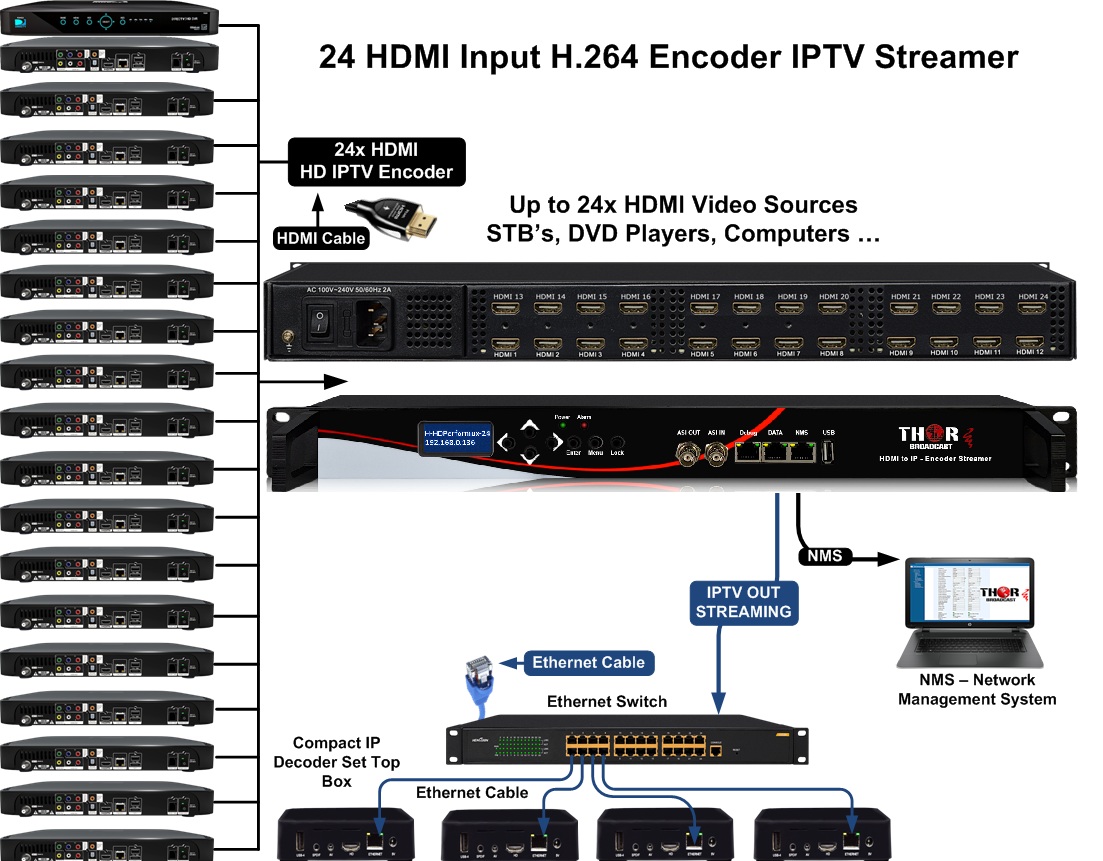
Thor Broadcast High Density H.264/H.265 Encoder H-HDPerformux-XX is specifically designed and made to handle up to 24 HDMI inputs and output via 1MPTS or 24SPTS. This unit has a fully functioning GUI (Graphical User Interface) that Thor has designed to help you navigate and create all of your H.264/H.265 streams with MPEG 1 Layer 2 audio or AC3 audio passthrough. Additionally, you have a single ASI output that will mirror the MPTS output. It specifically features QR code, logo, and OSD insertion for cable operators that require this feature. Furthermore, it has PID remapping, PCR, and PSI/SI adjusting and editing as well. This 1RU unit can replace an entire headend, offering a high-density 24 HDMI input chassis, easy operation, and Thor Broadcast's leading warranty and free tech support from our lab in Los Angeles.
4 / 8 / 16 / 24 HDMI inputs and 1 USB input
MPEG-4 AVC/H.264/ H.265 - High Efficiency Video Coding (HEVC) video encoding - Selectable
1 Gigabit output for UDP and RTP/RTSP protocols
1-13 Mbps output data per IP stream
MPEG-1 Layer II audio encoding and support for audio gain adjustment
MPEG-1 Layer 2, LC-AAC, HE-AAC, AC3 passthrough audio encoding
Control via web management and easy updates via RJ45
1 ASI output, copy of MPTS output; 1 ASI input for daisy chaining or contribution
CBR / VBR
QR code, logo, and OSD insertion
Null Packet Filter
PID remapping (180 inputs per channel)
PCR adjusting
PSI/SI editing and insertion
Exceptional price per channel
Model Numbers
H-HDPerformux-4 4 channel HDMI to IP H.264 / H.265 Encoder Streamer
H-HDPerformux-8 8 channel HDMI to IP H.264 / H.265 Encoder Streamer
H-HDPerformux-16 16 channel HDMI to IP H.264 / H.265 Encoder Streamer
H-HDPerformux-24 24 channel HDMI to IP H.264 / H.265 Encoder Streamer
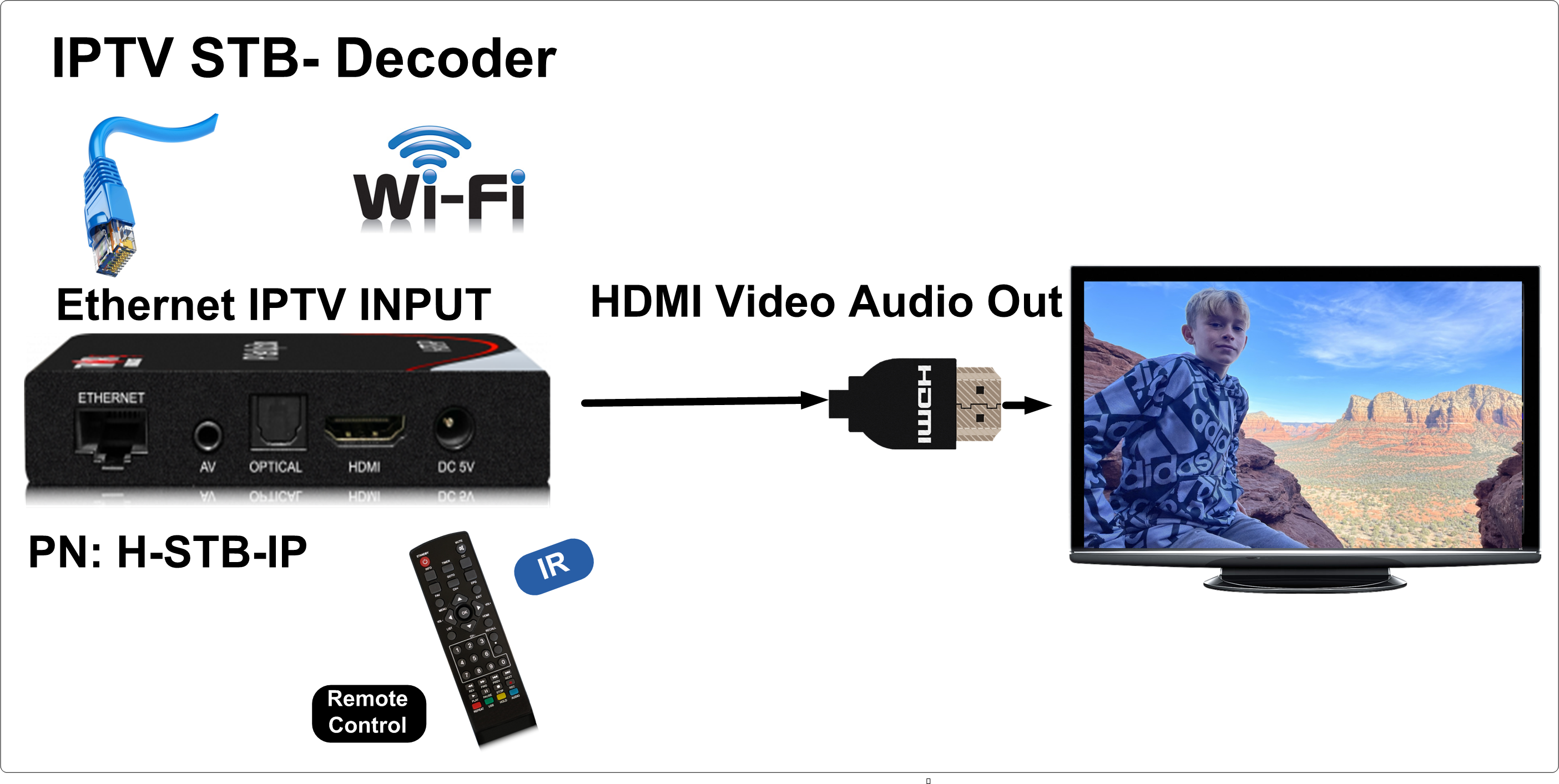
IPTV encoders are a valuable piece of infrastructure to transmit multiple channels or programs over a LAN easily, and generally in H264/H.265 . However, it is essential that you use a decoding apparatus like an IP-STB here that can receive those programs via IP addresses in H264 and output that signal via HDMI so a television or screen can receive them.
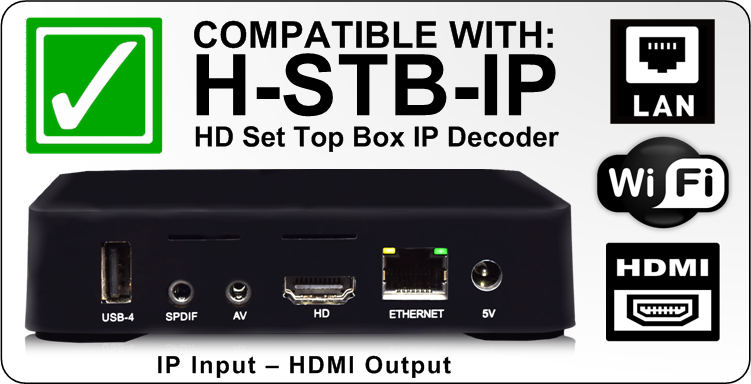
Our Encoders can be used with our IP STB's ( set-top Boxes ) - IP to HDMI decoders
|
Input |
4/8/16/24 HDMI inputs and 1 USB input |
|||||
|
Video |
Resolution |
Input |
1920×1080_60P, 1920×1080_60i, 1920×1080_50P, 1920×1080_50i, 1280×720_60P, 1280×720_50P, 720 x 576_50i,720 x 480_60i |
|||
|
Output |
1920×1080_30P, 1920×1080_25P, 1280×720_30P, 1280×720_25P, 720 x 576_25P, 720 x 480_30P |
|||||
|
Encoding |
1) MPEG-4 AVC/H.264 2) H.265 - High Efficiency Video Coding (HEVC) |
|||||
|
Bit-rate |
1Mbps~13Mbps each channel |
|||||
|
Rate Control |
CBR/VBR |
|||||
|
GOP Structure |
IP…P (P Frame adjustment, without B Frame ) |
|||||
|
Audio |
Encoding |
MPEG-1 Layer 2, LC-AAC, HE-AAC, AC3 Passthrough |
||||
|
Sampling rate |
48 KHz |
|||||
|
Resolution |
24-bit |
|||||
|
Audio Gain |
0-255 Adjustable |
|||||
|
Bit-rate |
48/56/64/80/96/112/128/160/192/224/256/320/384Kbps | |||||
|
Multiplexing |
Maximum PID Remapping |
180 output PIDs per channel |
||||
|
Function |
PID remapping (automatically or manually) |
|||||
|
Accurate PCR adjustment |
||||||
|
Stream output |
ASI output (optional) as a copy of MPTS IP output through Data1 (GE) or Data2 (FE) over UDP and RTP protocol (8 HDMI inputs with 8 SPTS and 1 MPTS output; 16/24 HDMI inputs with 16/24 SPTS or 1 MPTS output) | |||||
|
System function |
Network management (WEB) |
|||||
|
English |
||||||
|
Ethernet software upgrade |
||||||
|
Miscellaneous |
Environment |
0~45C (operating), -20~80C storage | ||||
|
Power requirements |
AC 110V+/- 10%, 50/60Hz, AC 220 +/- 10%, 50/60Hz |
|||||
| H-HDPerformux-8 | WEIGHT: 13.9 lb BOX SIZE (IN): 21.25 x 17.25 x 5 in BOX SIZE (MM): 540 x 439 x 127 mm UNIT SIZE (IN): 19 x 13 x 2 in UNIT SIZE (MM): 483 x 331 x 51 mm |
|||||
| H-HDPerformux-16 | WEIGHT: 17.4 lb BOX SIZE (IN): 22.5 x 22.5 x 5.5 in BOX SIZE (MM): 572 x 572 x 140 mm UNIT SIZE (IN): 19 x 13 x 2 in UNIT SIZE (MM): 483 x 331 x 51 mm |
|||||
| H-HDPerformux-24 | WEIGHT: 19.5 lb BOX SIZE (IN): 22.5 x 22.5 x 5.5 in BOX SIZE (MM): 572 x 572 x 140 mm UNIT SIZE (IN): 19 x 13 x 2 in UNIT SIZE (MM): 483 x 331 x 51 mm |
|||||
The 100m is the maximum CAT5 that can run.
If you do not have a link, then you need to put an Ethernet switch somewhere in between, or you can use point-to-point optical transceivers like those below. By using them, you can extend Ethernet for many km:
There is no CAT 5 amplifier. Ethernet doesn't have power like CATV RF.
No, as I mentioned, Ethernet cannot be stronger or weaker; it is a data stream signal.
POE Switch does not do anything for this. POE switch can send DC power over the CAT 5 to power a POE device like a camera, so you do not have to use an external DC power supply, but it doesn't extend the range of the Ethernet signal.

Unfortunately, it is impossible to distribute multicast streams over WiFi reliably. WiFi doesn't have that ability and doesn't support it. It needs to be distributed over a copper LAN network. You can set up a unicast stream and, instead of the multicast IP address, place the destination (decoder/receiver/PC) IP address, but the encoder Data IP address needs to be on the same subnet as a receiving device. So for example, if the receiving PC address is 192.168.2.100, the data IP also needs to be on the 192.168.2.XX network. Please note the NMS and Data IP must be on different subnets
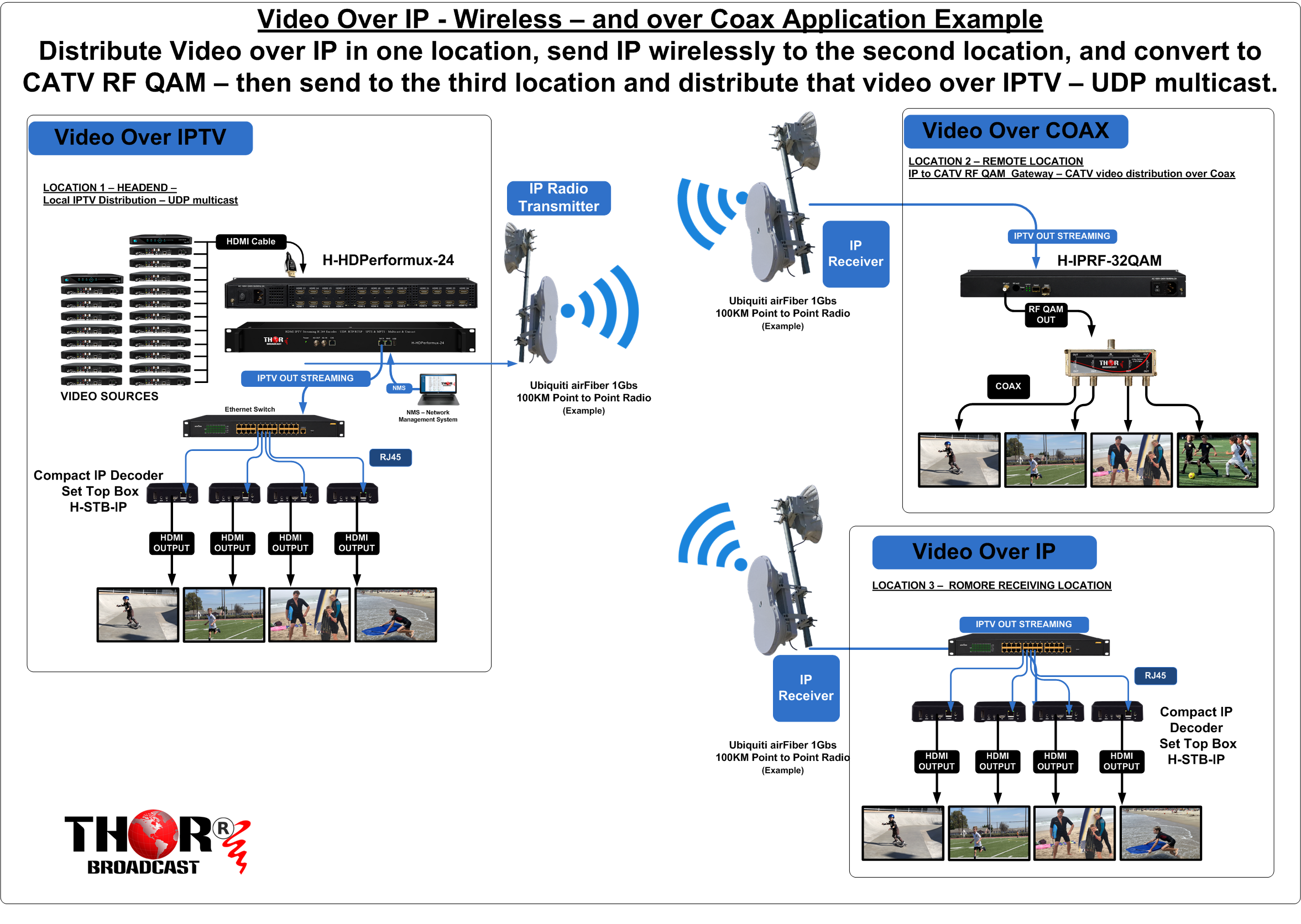
"UDP (User Datagram Protocol) multicast is a type of IP multicast that uses UDP as the transport protocol. It allows for the efficient one-to-many distribution of data to multiple receivers on a network. This is achieved by sending a single copy of the data to a special IP address called a "multicast group" that represents the group of receivers that should receive the data.
To use UDP multicast, a sender sends data to the multicast group IP address, and any device that has joined that group will receive the data. The sender does not need to know the individual IP addresses of the receivers, only the multicast group address.
Receivers can join and leave a multicast group at any time using a process called "multicast group membership". This is typically done using the Internet Group Management Protocol (IGMP) or the Multicast Listener Discovery (MLD) protocol.
UDP multicast is widely used in a variety of applications such as streaming video, online gaming, and software updates."
The 16 streams would require approximately 160Mbps of bandwidth You could use the following encoders: 8ch- 24ch HDMI H-HDPerformux-8 - H-HDPerformux-24 https://thorbroadcast.com/product/4-8-16-24-hdmi-iptv-streaming-8230.html/214 For the SDI, we have only 2 models: 4ch - H-4HD-EMS https://thorbroadcast.com/product/4-hd-sdi-broadcast-encoder-iptv-and-asi-out-mpeg2-8230.html 12 CH H-12SDI-QAM-IPLL https://thorbroadcast.com/product/12-hd-sd-3g-sdi-with-608-708cc-closed-captioning-catv-rf-modulator.html/41 This is the link to the H-STB-IP IP to HDMI decoders you could use for decoding H-STB-IP https://thorbroadcast.com/product/compact-ip-decoder-set-top-box.html Please review and let me know if that is clear. Please let me know how many HDMI channels and SDI channels you will need.
H.264, also known as MPEG-4 AVC (Advanced Video Coding), is a video compression standard that is used to encode video data in a digital format. It is widely used in video compression for a variety of applications, including streaming video, television broadcasting, and video conferencing.
H.264 has several different "profiles" that determine the set of features supported by the codec. The most commonly used profiles are:
Baseline Profile (BP): This profile is designed for low-complexity devices such as cell phones and is the most widely supported profile by consumer devices.
Main Profile (MP): This profile is designed for standard-definition (SD) video and provides a higher level of compression than the Baseline Profile.
High Profile (HiP): This profile is designed for high-definition (HD) video and provides a higher level of compression than the Main Profile.
High 10 Profile (Hi10P): This profile is designed for high-definition (HD) video with 10-bit color depth and provides a higher level of compression than the High Profile.
High 4:2:2 Profile (Hi422P): This profile is designed for high-definition (HD) video with 4:2:2 chroma subsampling and provides a higher level of compression than the High Profile.
Each profile is designed to address specific use cases and requirements; therefore, the main advantage of one profile over another is the level of compression, video quality, and the specific features and capabilities it supports.
Are you familiar with the difference between multicast and unicast streaming?
The unit outputs UDP/RTP multicast streams, which means that any devices on the network with IGMP protocol enabled can receive the streams.
For example, the syntax for VLC players is udp://@(multicast IP address):(port number), for instance, udp://@224.2.2.2:2234.
For mobile applications, you would need a video server and encoder to stream UDP to the server.
The server then streams HLS streams to the devices that requested the streams, like mobile phones.
This can be a hardware server or software, with many consumers using Wowza.
---
You mentioned that you want to stream from an IP encoder to your phone, which you cannot do without the video server since multicast UDP does not support it. Please do the following test: output a UDP multicast with the example 224.2.2.2 port 2234 and connect the data port to the switch. Then, on the VLC media player, type the following syntax udp://@224.2.2.2:2234 and let's check. You need to enable the IGMP protocol on the switches in order to send multicast. You can test it directly without the switch. Connect the PC directly to the Data port, then use VLC. I do not have a recommendation for the video servers because we do not make them. Some customers are using Wowza servers, and any video server that inputs UDP multicast and outputs HLS would work. UDP multicast streaming is a method of transmitting data packets from one source to multiple destinations simultaneously over a network. In this type of communication, the sender sends a single copy of the data to the multicast group IP address, and the network ensures that it is delivered to all interested receivers who have joined the multicast group. To set up a network for IGMP protocol, you need to configure your network devices like routers, switches, and firewalls to support multicast traffic. Here are the basic steps to set up a network for IGMP protocol: Configure the multicast source: Configure the source device (e.g., server) to send multicast traffic with a specific IP address range. Enable multicast routing: Enable multicast routing on your network devices. Multicast routing enables the network devices to send multicast traffic to the correct network segment. Configure IGMP snooping: Configure IGMP snooping on your switches to ensure that multicast traffic is forwarded only to those ports that are interested in receiving the traffic. Enable PIM: Enable Protocol Independent Multicast (PIM) on your routers. PIM is a protocol used to route multicast traffic across multiple networks. By following these steps, you can set up a network that supports IGMP protocol and UDP multicast streaming.It is possible to achieve that, but it can be a bit complex. Each channel would need to be re-encoded, which means we would first need to decode each program to HDMI video format using separate Cable TV STBs. Then, we would use HDMI encoders to produce IP streams. HDMI encoders have the ability to inject text or images and incorporate them into the IP streams. The IP streams would then be converted back to HDMI using IP STBs.
Please let me know how many channels you would like to process in this manner.
We have 8 to 24-channel HDMI encoders available. The 8-channel HDMI encoder is priced at $4,295, while the 24-channel HDMI encoder is priced at $5,995. Additionally, we have the H-STB-IP available for $169 each, which is the compact IP decoder set-top box.
In video encoding and streaming, GOP stands for "Group of Pictures." It is a term used in video compression to describe a collection of successive frames within a coded video stream. The GOP structure significantly influences the efficiency and quality of the video compression process.
Understanding GOP in TS StreamStructure:
GOP Size:
Compression Efficiency:
Video Quality:
Latency:
The choice between a GOP size of 25 and 50 depends on your specific use case:
Ultimately, the best GOP setting depends on your specific needs regarding video quality, compression efficiency, and latency. For most general use cases, a GOP size of 25 is a safe and balanced choice, while a GOP size of 50 might be better for high-quality, prerecorded videos where compression efficiency is a higher priority.
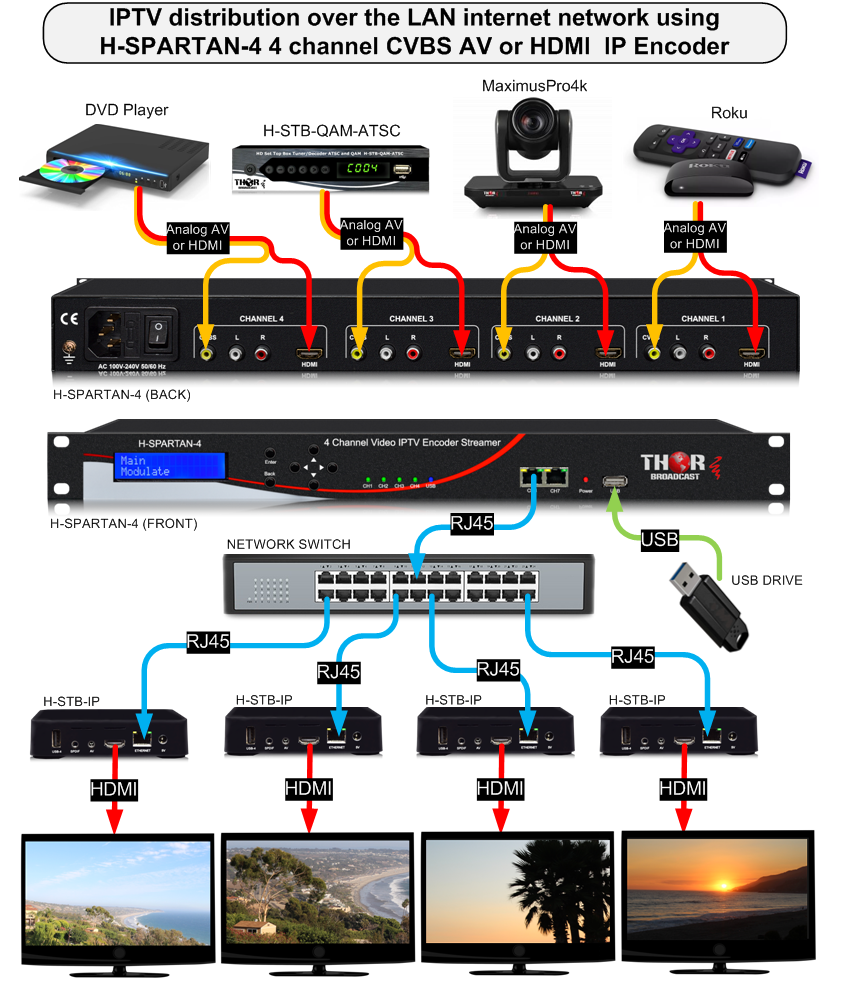
I have two questions:
I'm asking because you will not be able to convert Comcast's signal directly to IP unless they supply Clear QAM - which is very unusual these days (most cable providers encrypt their channels).
If your QAM signal is encrypted (which is typical), you would need Comcast-provided set-top boxes (STBs) to decode their QAM signal to HDMI. From there, we can encode each HDMI output to IP. In your case, that would require approximately 70 Comcast STBs + 70-channel IP encoders. This is doable, but it's impractical, expensive, and requires a lot of rack space/power/maintenance.
Here's an example of such a device: Thor H-IP-STB or similar low-cost IP -> HDMI multicast decoder
https://thorbroadcast.com/product/compact-ip-decoder-set-top-box.html
Please let me know the answers to the two questions above so we can recommend the best and most cost-effective solution for your setup.
In my humble opinion, it would be much easier and less expensive to leave the video distribution over coax - if you can - and then convert everything over to IP only where necessary.
Switching everything to IP is more complex and more expensive.
This is the link to 8ch SDI QAM modulator you can use for your 20Ch SDI sources:
H-HYBRID-RF-8
https://thorbroadcast.com/product/8-channel-sdi-and-hdmi-clear-catv-rf-modulator-qam-8230.html
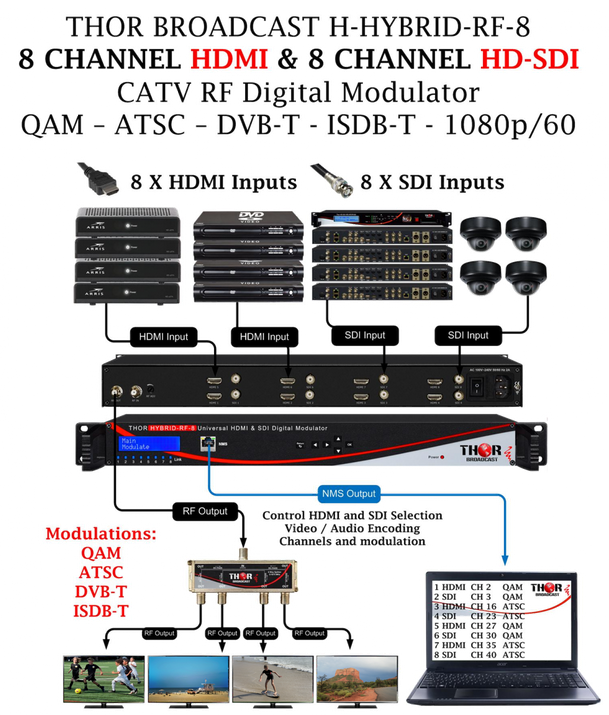
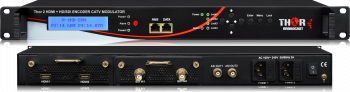 2 HD/SD SDI + 2 HDMI Broadcast MPEG2 & H.264 1080p Encoder IPTV and ASI
H-2SDI-2HDMI-ENC is a 4-channel HD 2 SDI and 2 HDMI MPEG2 and H.264 IPTV and ASI encoder. It supports low latency, CC, and Dolby AC3 audio encoding. It outputs 4 SPTS IPTV TSs and 1 MPTS, and supports HD 720p/1080i/1080p/60hz
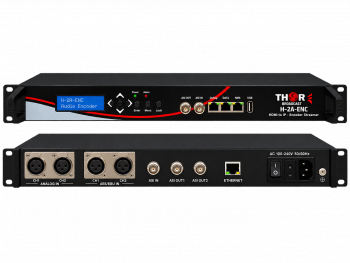 2-Channel Professional Audio Encoder with ASI & IP Output
Professional two-channel MPEG-1 Layer II/AAC audio encoder with balanced analog and AES/EBU XLR inputs, ASI I/O and UDP/RTP IP streaming.

 ES
ES