| Availability: | In stock | Condition: | new |
|
| Shipping: | starting at $0.00 | Warranty: | 2Yrs |
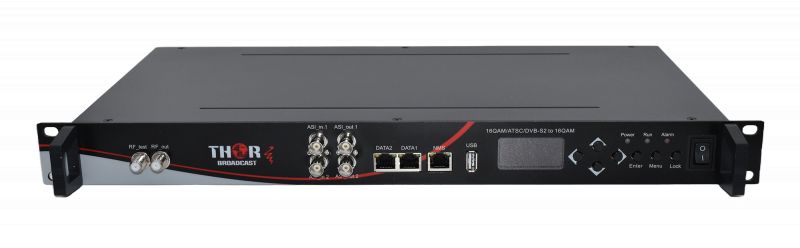
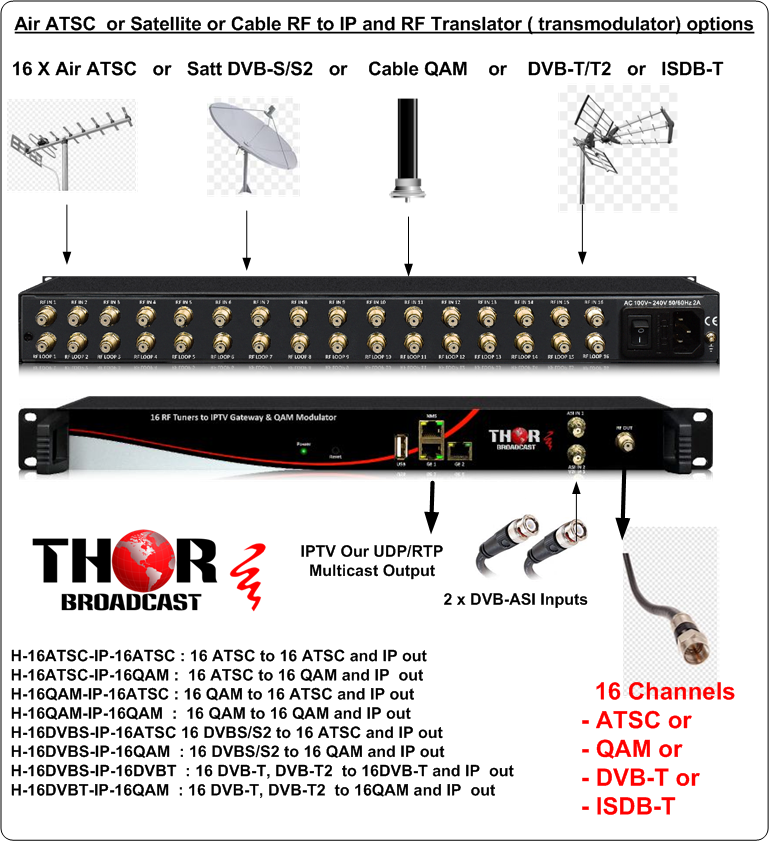
CATV RF to IP Gateway + CATV RF Trans-modulator for QAM, ATSC, DVB-S/S2, DVB-T, ISDB-T
16 RF Inputs to IP Outputs + 16 RF Outputs
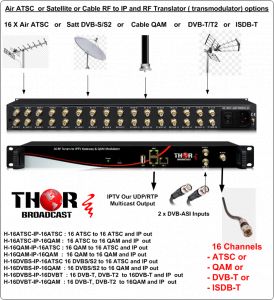
This unit can take existing ATSC channels and convert them to IP streams and QAM RF channels simultaneously (RF input = IP + RF output).
EXAMPLE Model numbers can be (H-16QAM-IP-ATSC ---- H-16DVBS-IP-ATSC)
RF Inputs can be ATSC / QAM / DVB-S/S2 / DVB-T / ISDB-T
RF Outputs can be ATSC / QAM / DVB-T / ISDB-T
This gateway and transmodulator is a unique device that can easily convert existing RF streams, up to 16 frequencies, to IP and RF channels. This allows you to add RF to an existing RF channel bank, as well as create IP streams for easy access via LAN. For example, you can convert ATSC to IP and QAM, or you can convert DVB-S2 to IP and QAM, or also use it as a translator so you can take 16 QAM frequencies and convert them to IP and 16 QAM (different frequencies, if you would like to rearrange your channel lineup). The vast array of options makes this an ideal headend piece to quickly and efficiently become more dynamic, add free OTA channels to a QAM headend, or simply create an RF to IP gateway with existing RF programs. This is the exact same unit that is mentioned above, with the added benefit of transmodulation. We can essentially mix and match any RF to any RF, with a couple of exceptions. Please contact your local dealer or Thor directly for more information.
Simply put, it is a 16 RF to 16 RF + IPTV gateway. This is a multi-standard CATV, Air, and Satellite Digital modulation standard transmodulator-converter with IPTV output.
The unit has 16 individual tuner inputs, and depending on the model, it can support the following modulation standards:
Depending on the model, the output can be ATSC, QAM, DVB-T, or ISDB-T.
The unit can also be used for the same modulation conversions, like QAM to QAM or ATSC to ATSC, for up or down channel conversion.
In addition, the device has an IPTV output, so each TS from the inputs can be output as a UDP/RTP multicast or unicast for local LAN video distribution over the network.
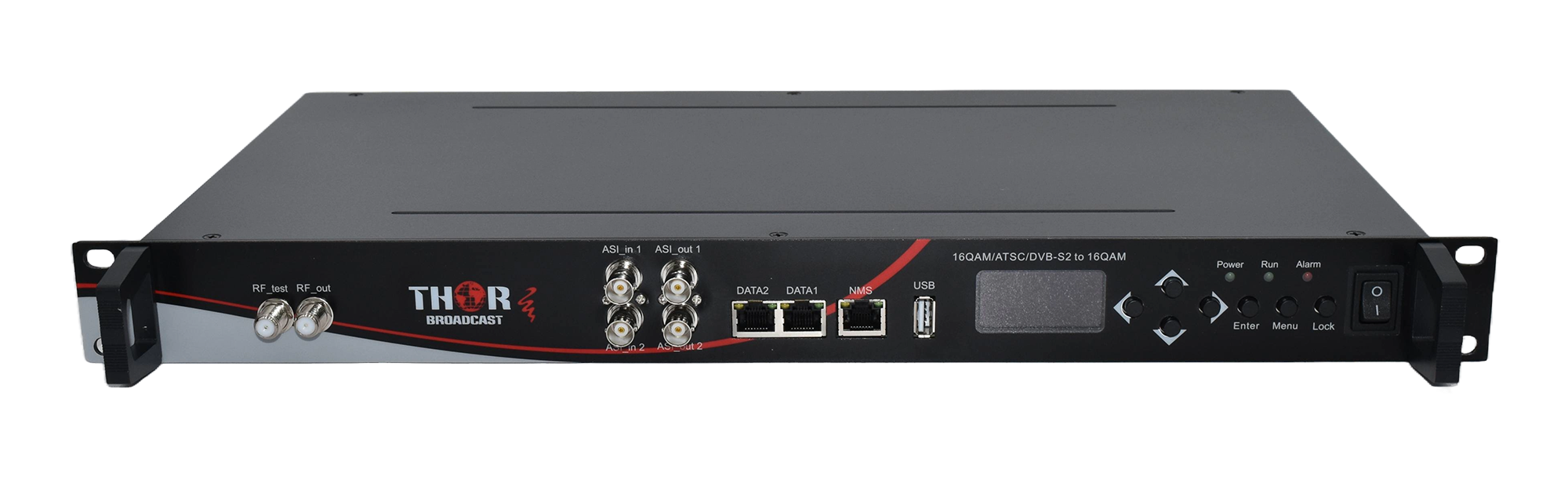
The device also has 2 independent DVB-ASI inputs, allowing additional TS programs from external encoders to be injected into the modulator as separate channels or subchannels.
This version corrects grammatical errors and improves the flow and clarity of the original text. Let me know if there are any other areas where you need assistance.
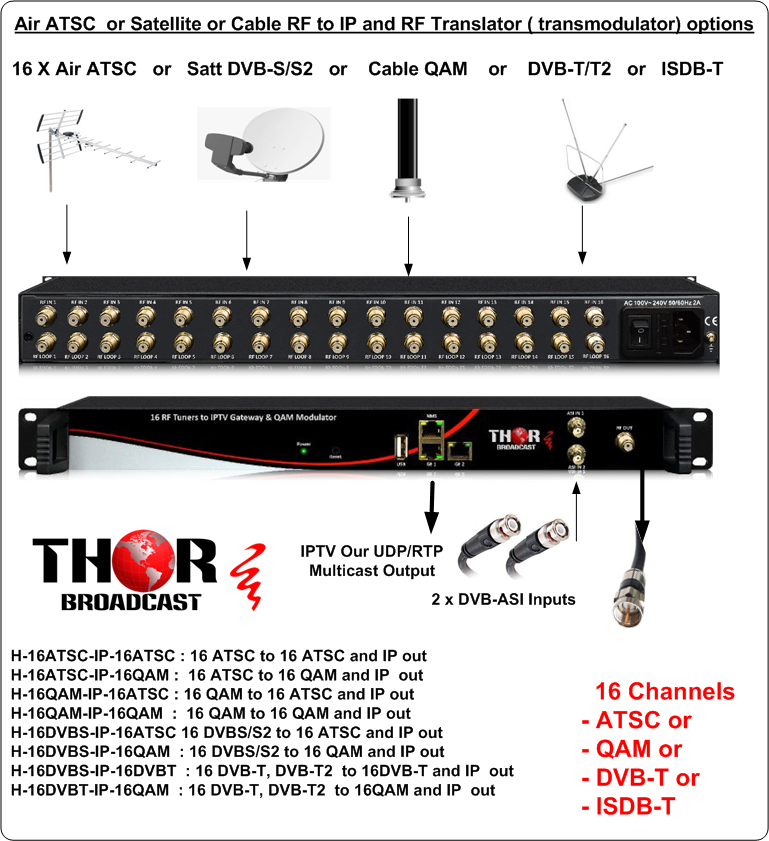
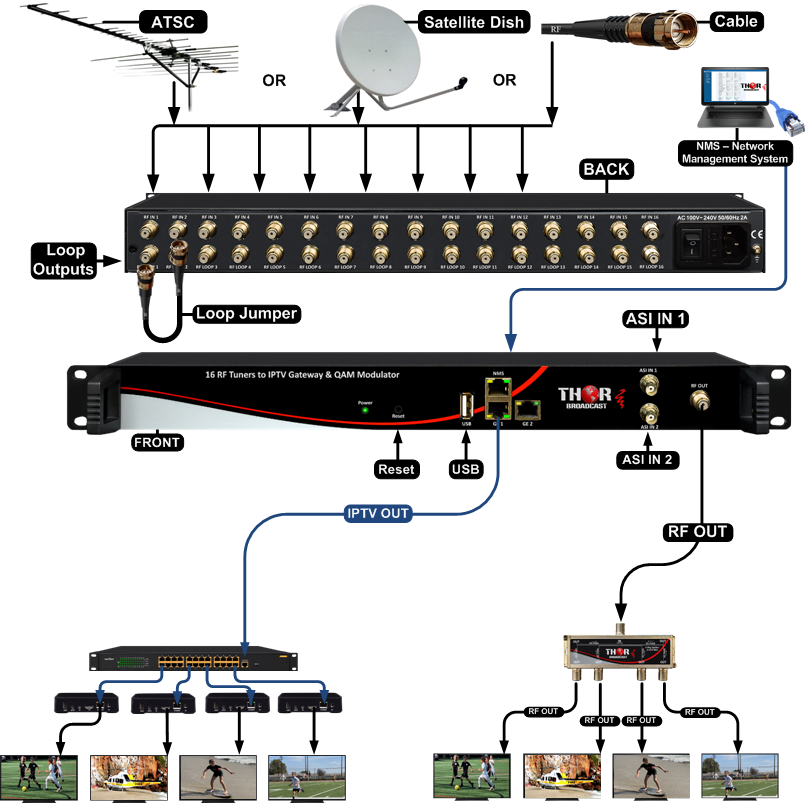
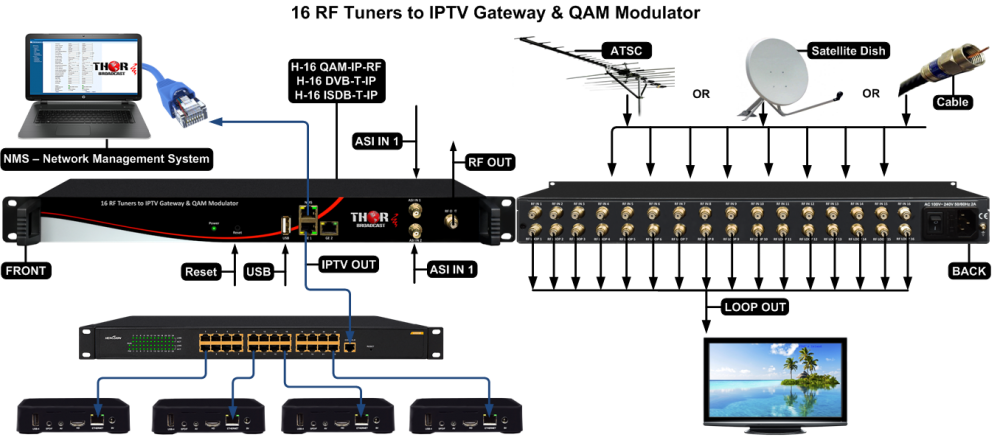
Satt or Cable or Air RF to IP and RF Translator ( transmodulator)
H-16ATSC-IP-16ATSC : 16 ATSC to 16 ATSC and IP out
H-16ATSC-IP-16QAM : 16 ATSC to 16 QAM and IP out
H-16QAM-IP-16ATSC : 16 QAM to 16 ATSC and IP out
H-16QAM-IP-16QAM : 16 QAM to 16 QAM and IP out
H-16DVBS-IP-16ATSC 16 DVBS/S2 to 16 ATSC and IP out
H-16DVBS-IP-16QAM : 16 DVBS/S2 to 16 QAM and IP out
H-16DVBS-IP-16DVBT : 16 DVB-T, DVB-T2 to 16DVB-T and IP out
H-16DVBT-IP-16QAM : 16 DVB-T, DVB-T2 to 16QAM and IP out
|
Input |
16 INPUT FTA Tuner selection:: DVB-S/S2 OT ATSC or DVB-C Annex A/B QAM (Model dependent) |
||
|
512 IP (GE1only)input over UDP and RTP protocol |
|||
|
2 ASI input, BNC interface |
|||
|
Tuner Section |
DVB-S |
Input Frequency |
950-2150MHz |
|
Symbol rate |
2-45Msps |
||
|
Signal Strength |
-65~-25dBm |
||
|
FEC Demodulation |
1/2, 2/3, 3/4, 5/6, 7/8 QPSK |
||
|
DVB-S2 |
Input Frequency |
950-2150MHz |
|
|
Symbol rate |
QPSK 1~45Mbauds 8PSK 2~30Mbauds |
||
|
Code rate |
1/2, 3/5, 2/3, 3/4, 4/5, 5/6, 8/9, 9/10 |
||
|
Demodulation Mode |
QPSK, 8PSK |
||
|
Multiplexing |
Maximum PID Remapping |
128per input channel |
|
|
Function |
PID remapping (automatically or manually) |
||
|
Accurate PCR adjusting |
|||
|
Generate PSI/SI table automatically |
|||
|
Modulation Output |
Modulation Output format |
ATSC or DVB-C Annex A / B QAM ( model dependendt, please chek model selection) |
|
|
Standard |
EN300 429/ITU-T J.83A/B or 8VSB ( ATSC model ) |
||
|
MER |
≥40db |
||
|
RF frequency |
50~960MHz, 1KHz step |
||
|
RF output level |
-20~+10dbm(87~107 dbµV),0.1db step |
||
|
Symbol Rate |
5.0Msps~7.0Msps, 1ksps stepping |
||
|
Constellation |
16/32/64/128/256QAM |
||
|
|
J.83A |
J.83B |
|
|
Constellation |
16/32/64/128/256QAM |
64/256 QAM |
|
|
Bandwidth |
8M |
6M |
|
|
System |
Remote management |
Web NMS (10M/100M) |
|
|
RF Out |
16 DVB-C output or ATSC ( model dependendt, please chek model selection) |
||
|
IP Out |
1 IP (MPTS) output over UDP and RTP/RTSP (GE1 only) Mirrors one carrier |
||
|
Language |
English |
||
|
Software Upgrading |
Web |
||
|
General |
Temperature |
0~45°C(Operation) ; -20~80°C(Storage) |
|
|
Power |
AC 100V±1050/60Hz; AC 220V±10%, 50/60HZ |
||
|
Consumption |
25W |
||
| WEIGHT: 8.9 lb BOX SIZE (IN): 22 x 14.5 x 4.5 in BOX SIZE (MM): 559 x 369 x 115 mm UNIT SIZE (IN): 19 x 9.5 x 2 in UNIT SIZE (MM): 483 x 242 x 51 mm |
|||
Great question. Our units are very flexible and designed exactly for this type of application.
You are not limited to passing the full RF stream. Our gateways can work both ways - you can pass the entire transport stream or select only the specific sub-channels (programs) you want, depending on your bandwidth needs.
You can take a look at:
H-8ATSC-IP https://thorbroadcast.com/product/atsc-or-qam-to-ip-gateway-atsc-qam-iptv-broadcast-8230.html
H-16ATSC-IP https://thorbroadcast.com/product/16-rf-tuners-to-iptv-1.html/116
They can output streams as UDP multicast or unicast, and you can choose between full MPTS or selected programs (SPTS).
This makes them very efficient for transport over GRE tunnels.
Please review and let me know if this fits your setup.
--------------------
SPTS capability I think is exactly what we need for efficiency. If you use these as SPTS, does that limit each tuner to one channel, or can we send, say, 2/4 of the subchannels from one tuner? We have 6 desired RF channels but may want to send about 16 channels all together. About half of what's available. Would we need the H-16atsc, or would the H-8 work? ------------------------ Each tuner is not limited to one channel. From a single RF carrier, you can select multiple sub-channels, and the unit will generate a separate SPTS stream for each one - only the specific programs you choose. In your case, with 6 RF channels and approximately 16 total programs, the H-8ATSC-IP will be more than enough. You can tune those 6 carriers and pull multiple sub-channels from each to reach your 16 streams. There is no need for the 16-tuner unit unless you plan to expand your RF carrier count later.Customer:
We currently have several Thor modulators. We have around seven units total, including Hybrid-8 units, a Thunder-8, and some other HDMI/QAM/IP modulators. They are all feeding into our in-house coax RF system, where we distribute channels over QAM.
Do you have a product that can take our existing QAM RF channels and convert them to IP?
Adam: Yes, absolutely. The product you need is the H-16QAM-IP. It is a 16 RF tuner to IPTV gateway.
We also offer an 8-channel version, but for your application, the 16-channel model makes more sense because the price difference is not very large compared to the additional tuner capacity.
Customer: So this would take the QAM channels coming from our existing Thor modulators and convert them to IP?
Adam: Correct. The unit receives QAM RF channels from your coax system and converts each selected QAM channel into a UDP multicast IPTV stream.
Each unit has 16 RF tuners. Each tuner locks onto one physical QAM channel. Whatever program is on that QAM channel is then output as its own IP multicast stream.
Customer: We have several Thor units. Some are Hybrid-8 units, one is a Thunder-8, and we also have a few smaller modulators. I think we may have around 32 to 37 physical QAM channels total. How many QAM-to-IP units would we need?
Adam: If you have about 32 QAM channels that you want to convert to IP, you would need two H-16QAM-IP units. Each one handles 16 QAM channels, so two units give you 32 tuners total.
If you have closer to 37 or more channels, then you would need three units, which would give you up to 48 tuners.
Customer: Can I feed each modulator directly into the QAM-to-IP unit? For example, connect each Hybrid-8 output into one of the RF inputs?
Adam: That is not the best way to do it.
The correct method is to first combine all of your QAM modulator outputs, just like you already do for your coax distribution system. After the combiner, you will have one coax feed carrying your full QAM channel lineup.
You then feed that combined RF signal into the H-16QAM-IP units. Each tuner inside the unit is programmed to tune to one specific QAM channel from that combined RF feed.
Think of it like a TV tuner. The coax cable may carry many channels, but each tuner locks onto one channel at a time.
Customer: So the H-16QAM-IP does not replace my combiner?
Adam: Correct. The combiner stays in place.
Your modulators feed the combiner. The combiner creates one combined RF output with all of your QAM channels. From there, you can split the RF signal and feed the QAM-to-IP gateway units.
Customer: If one coax feed already carries all the QAM channels, why do I need to split it into multiple RF inputs on the unit?
Adam: The reason is RF signal level.
Each RF input on the H-16QAM-IP is connected to one tuner. The unit also has loop-through connections, so you can feed one RF input and loop the signal through to the next tuner input.
However, every loop-through connection has some RF loss. If you loop through too many inputs, the RF level may become too low by the time it reaches the last tuner.
For best performance, we recommend using an RF splitter after your combiner and feeding the unit in sections. For example, instead of looping through all 16 tuner inputs from one RF feed, you could use a splitter and feed every fourth input, then loop through only a few inputs at a time. This keeps the RF level more consistent across all tuners.
Customer: So for two H-16QAM-IP units, I would take the combined QAM RF output, split it locally, and feed both units?
Adam: Exactly.
For example:
Customer: The Ethernet output is a normal RJ45 network port, correct?
Adam: Yes, correct. It is a standard RJ45 Ethernet port. You connect that port to your network switch.
Each QAM channel will be converted to a separate multicast IP stream. For example:
Each stream has its own multicast address and port.
Customer: Can the unit see more than 16 QAM channels on the input?
Adam: Yes. You can feed the unit an RF lineup with many QAM channels, even 50 or 100 channels. The unit will only convert the channels assigned to its tuners.
For example, one H-16QAM-IP can see the full RF lineup, but it can only tune and convert 16 selected channels at one time.
If you need 32 channels converted, you use two units. If you need 48 channels converted, you use three units.
Customer: How would users watch the IPTV streams?
Adam: There are a few options.
For basic testing or temporary use, you can use VLC Player on a computer. VLC can open UDP multicast streams directly.
For TV viewing, you can use IPTV set-top boxes. Each set-top box can be programmed with the multicast stream addresses and display the channels like a normal TV channel lineup.
If you want a more polished user experience, with channel guide, management, user interface, mobile apps, or browser-based viewing, then you may eventually need an IPTV middleware/server system. The H-16QAM-IP provides the multicast IPTV streams, but the user-facing channel management layer would be handled by a separate IPTV platform.
Customer: So the H-16QAM-IP creates the multicast streams, but it does not provide the full IPTV user interface?
Adam: Correct. The H-16QAM-IP converts QAM RF channels into IPTV multicast streams. For simple viewing, VLC or IPTV set-top boxes can be used. For a complete managed IPTV system, you would add IPTV middleware or a server platform.
Customer: What is the advantage of the 16-channel model compared to the 8-channel model?
Adam: The 16-channel version gives you twice the number of tuners. Since the price difference between the 8-channel and 16-channel version is not very large, the 16-channel version is usually a better value when you have many QAM channels to convert.
Customer: Okay, that makes sense. So for around 32 QAM channels, I would need two H-16QAM-IP units. I can feed both units from the same combined QAM RF feed, and then each unit outputs its own multicast IP streams to the network switch.
Adam: Exactly. That is the correct setup.
Your existing QAM plant stays the same. We simply take the combined RF output, feed it into the QAM-to-IP gateways, assign each tuner to a QAM channel, and output the channels as UDP multicast IP streams.
Simple Technical Summary
The customer has multiple Thor QAM modulators feeding an existing coax RF system. They want to convert the QAM RF channels into IPTV streams.
The correct product is:
H-16QAM-IP - 16 RF Tuners to IPTV Gateway Product page: https://thorbroadcast.com/product/16-rf-tuners-to-iptv-1.html/117
Recommended SetupExisting Thor QAM modulators → RF combiner → combined coax RF feed carrying all QAM channels → RF splitter → H-16QAM-IP units → Ethernet switch → IPTV multicast streams → VLC, IPTV set-top boxes, or IPTV middleware/server
SizingThe customer does not need to feed each modulator individually into the gateway. The best method is to combine all QAM channels first, then feed the complete RF lineup into the QAM-to-IP gateway. Each tuner inside the gateway selects one QAM channel and converts it to its own UDP multicast stream
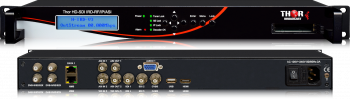 IRD - Satellite or ATSC Decoder to SDI, IP, ASI, Closed Captions
High-end, state-of-the-art decoder with RF tuner, advanced IP streaming, front LCD confidence monitor, and support for 608 and 708 closed captioning. RF tuners for DVB-S2, ATSC, and QAM are available. All settings and alarm information are available through a web browser-based network management console.
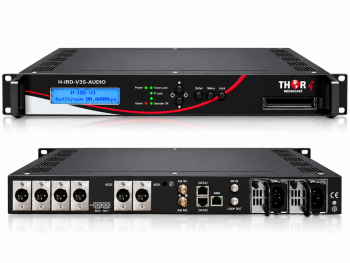 H-IRD-V3S-AUDIO - Professional Dual-Program Satellite & IP Audio Decoder
Professional dual-program audio decoder with DVB-S/S2/S2X, ASI and IP inputs, balanced XLR, AES/EBU and UDP/RTP SPTS outputs.

 ES
ES